Email Templates
LumoAuth sends transactional emails for authentication events, invitations, and security notifications. Customize these templates to match your brand and messaging.
Managing Templates
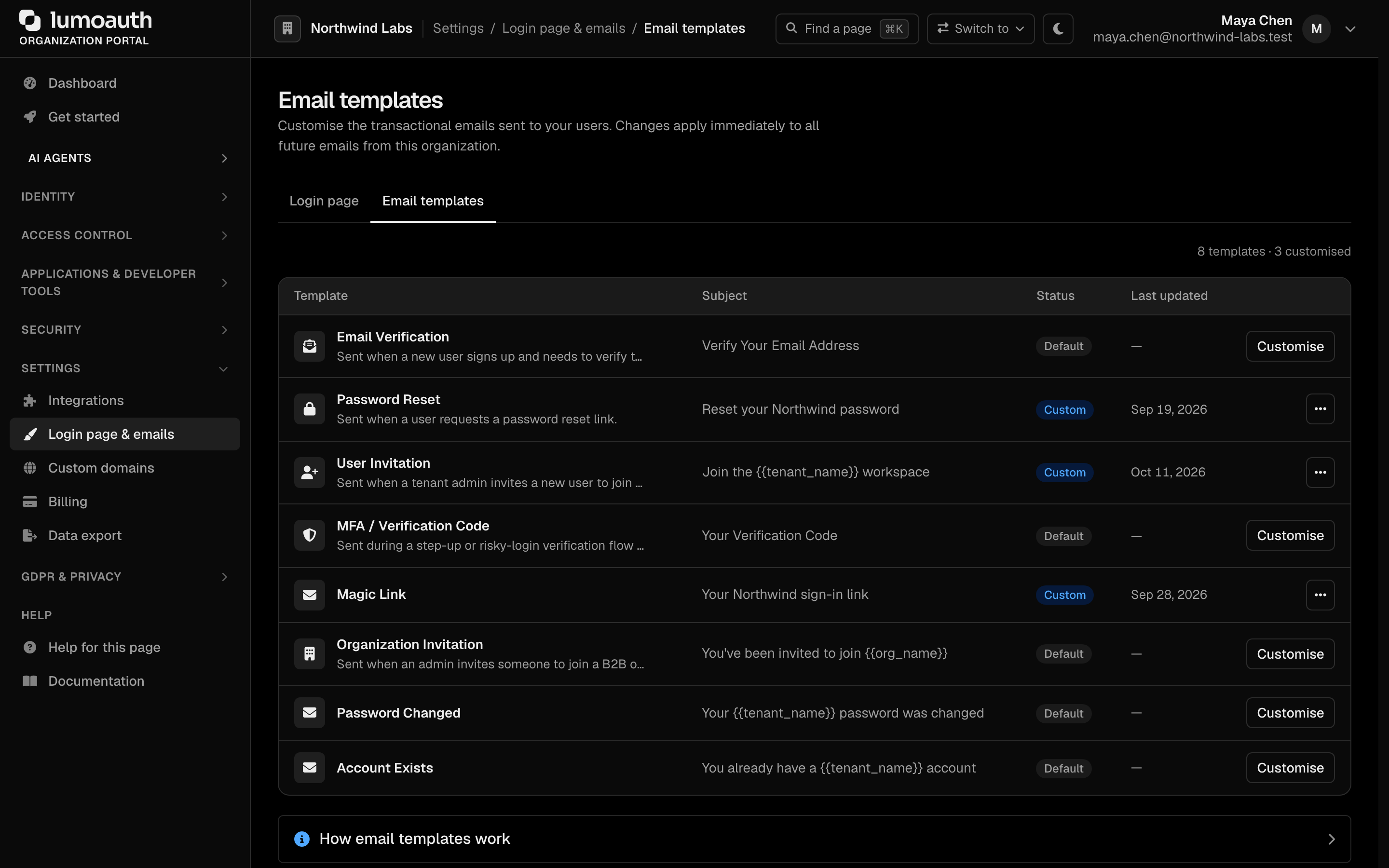
In the portal sidebar, open Login page & emails under Settings and switch to the Email templates tab (/orgs/{orgId}/portal/settings/email-templates) to view all email templates. Each row shows the template, its subject, whether it is the built-in Default or customised, and when it was last updated. A Customise action opens the editor.
Available Templates
There are eight customizable template types. The type value (in the URL and admin API) is shown in code:
Template (type) | Trigger | Description |
|---|---|---|
Email Verification (email_verification) | Registration / email change | Link to verify email address |
Password Reset (password_reset) | Password reset request | Link to reset password |
User Invitation (user_invitation) | Admin invites a user | Link to accept invitation and create account |
MFA Code (mfa_code) | Email MFA challenge | One-time code for email-based MFA (multi-factor authentication) |
Magic Link (magic_link) | Passwordless sign-in request | One-time sign-in link |
Organization Invitation (org_invitation) | User invited to an organization | Link to accept an organization invitation |
Password Changed (password_changed) | The password of an existing account changed | Security notice to the account owner, with a link to reset the password if they didn't make the change |
Account Exists (account_exists) | Someone signs up with an address that already has an account | Tells the owner an account already exists, with links to sign in and to reset the password. Self-registration shows the same response for new and existing addresses, so this e-mail is how the real owner finds out |
Customization Options
Content
Each template supports:
| Element | Description |
|---|---|
| Subject | Email subject line |
| HTML body | Rich HTML email content |
Template Variables
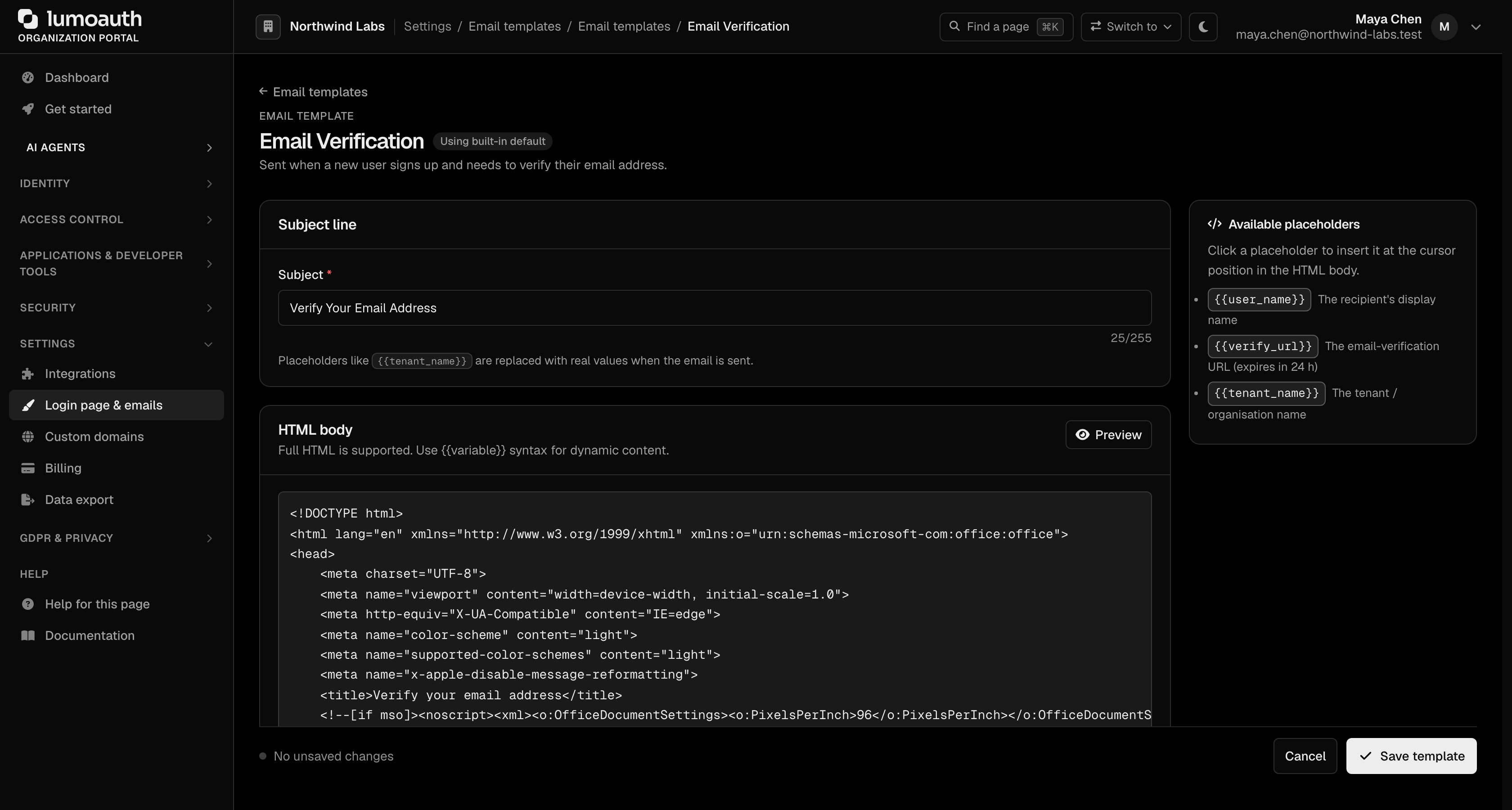
Variables are flat, {{snake_case}} placeholders — not dotted paths. Each template type exposes a different set. The editor lists them under Available placeholders for the template that you are editing (click one to insert it at the cursor). You can also fetch them via the admin API:
curl https://your-domain.com/orgs/{orgId}/api/v1/admin/email-templates/{type}/variables \
  -H "Authorization: Bearer {admin_token}"
| Variable | Used by | Description |
|---|---|---|
{{user_name}} | most templates | Recipient's display name |
{{tenant_name}} | all templates | Organization / organization name |
{{verify_url}} | email_verification | Email-verification link (expires in 24 h) |
{{reset_url}} | password_reset, password_changed, account_exists | Password-reset link (for password_changed and account_exists, the forgot-password page) |
{{login_url}} | account_exists | Sign-in page of the organization the account belongs to |
{{magic_url}} | magic_link | One-time sign-in link |
{{accept_url}} | user_invitation, org_invitation | Invitation-acceptance link |
{{code}} | mfa_code | The 6-digit one-time code |
{{expires_in}} | password_reset, magic_link | Relative expiry (e.g. 15 minutes) |
{{expires_at}} | user_invitation, org_invitation | Absolute expiry timestamp |
{{inviter_name}} | user_invitation, org_invitation | Who sent the invitation |
{{org_name}} | org_invitation | Organization the user is invited to |
{{message}} | user_invitation, org_invitation | Optional custom message from the inviter |
{{changed_at}} | password_changed | When the password was changed, in UTC |
{{changed_by}} | password_changed | Who changed it (see below) |
Password changed notice
The password_changed template (default subject: Your {{tenant_name}} password was changed) is sent to the account owner every time the password of an existing account changes, whatever the path. The path can be a self-service change, a forced change at sign-in, a password-reset link, a password set by an administrator (portal or Admin API), provisioning over SCIM (automatic user provisioning) or a CLI command. It is sent after the change is saved, so a change that fails sends nothing, and a delivery failure never reverses the change. It is not sent when an account is created, when a stored password hash is upgraded to a newer algorithm, or when a user is erased under GDPR.
Variables: {{user_name}}, {{changed_at}} (UTC), {{changed_by}}, {{reset_url}} (the forgot-password page) and {{tenant_name}}. {{changed_by}} is one of:
| Change made by | {{changed_by}} text |
|---|---|
| The user, while signed in (including a forced change) | you, while signed in to your account |
| A password-reset link | a password-reset link sent to this address |
| An administrator (portal, Admin API) or a CLI command | an administrator |
| SCIM provisioning | your organization's user provisioning system (SCIM) |
Account exists notice
The account_exists template (default subject: You already have a {{tenant_name}} account) is sent when a self-service sign-up uses an address that already belongs to an account, instead of revealing on the registration page that the address is taken. It is not sent for blocked or deleted accounts, and it is rate-limited per address so repeated sign-up attempts cannot flood the owner's inbox.
Branding
The HTML body is yours to style: put your logo, colours and footer directly in the template. There is no separate form for email branding; the Login page tab of Login page & emails styles the hosted sign-in pages only.
Example: Custom Verification Email
Editing the email_verification template body. Available variables: {{user_name}}, {{verify_url}}, {{tenant_name}}.
<h1>Welcome to {{tenant_name}}!</h1>

<p>Hi {{user_name}},</p>

<p>Please verify your email address to complete your registration.</p>

<a href="{{verify_url}}" style="background: #4F46E5; color: white; padding: 12px 24px; text-decoration: none; border-radius: 6px;">
  Verify Email
</a>

<p>This link expires in 24 hours.</p>

<p>If you didn't create this account, you can safely ignore this email.</p>
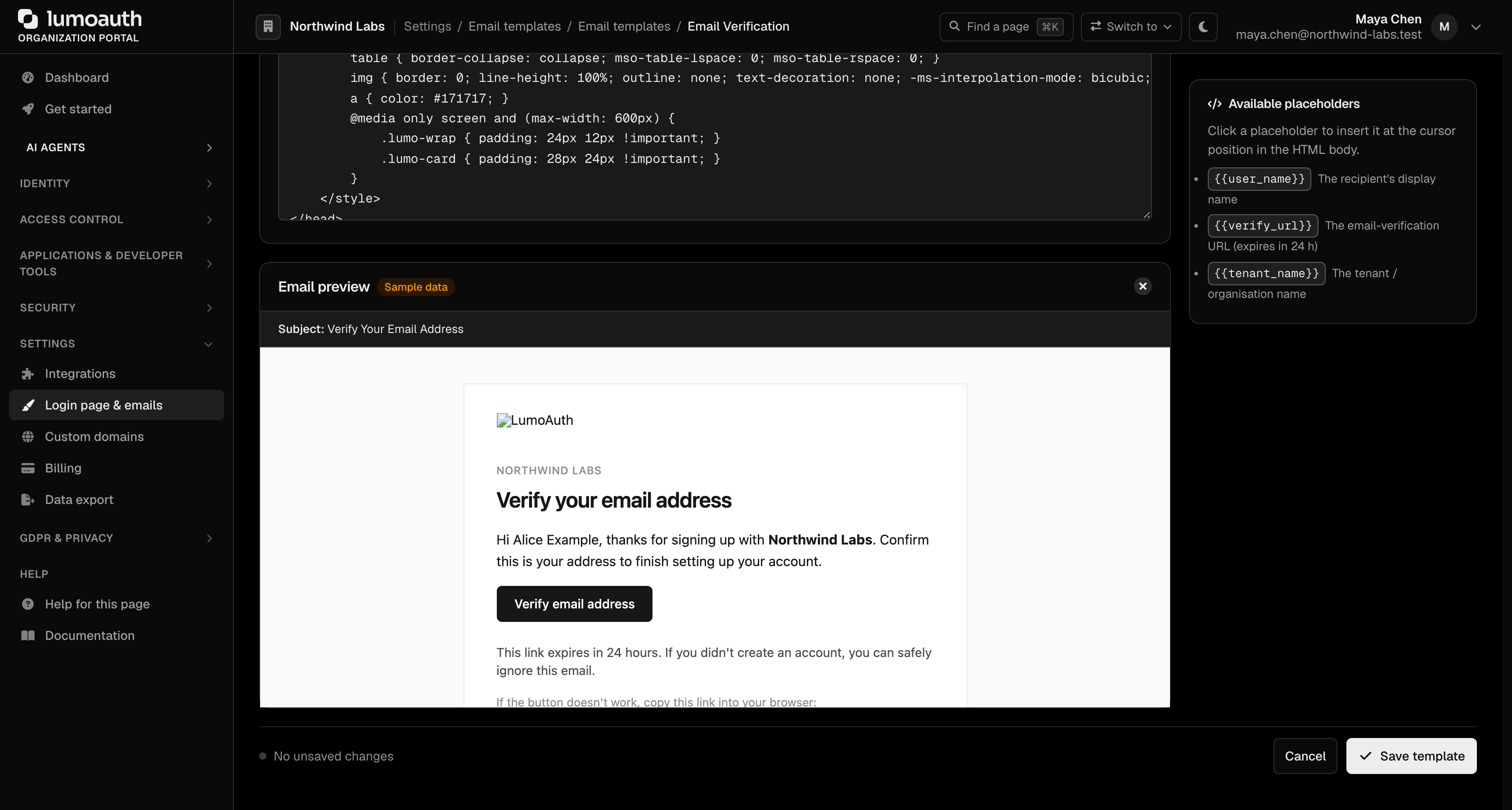
Before clicking Save template, use Preview to render the template with sample data
(/orgs/{orgId}/portal/settings/email-templates/{type}/preview). You can roll a
customized template back to the LumoAuth default at any time with Revert to default.
Email Delivery
By default LumoAuth sends mail through the platform mailer. To send from your own domain, configure the Email provider page (/orgs/{orgId}/portal/integrations/email), reached from the SMS & email delivery section of Integrations. It supports Amazon SES, SendGrid, Mailgun, Resend, Postmark or a custom SMTP server, with a From address and From name, a Send test email button and sent / failed counters.
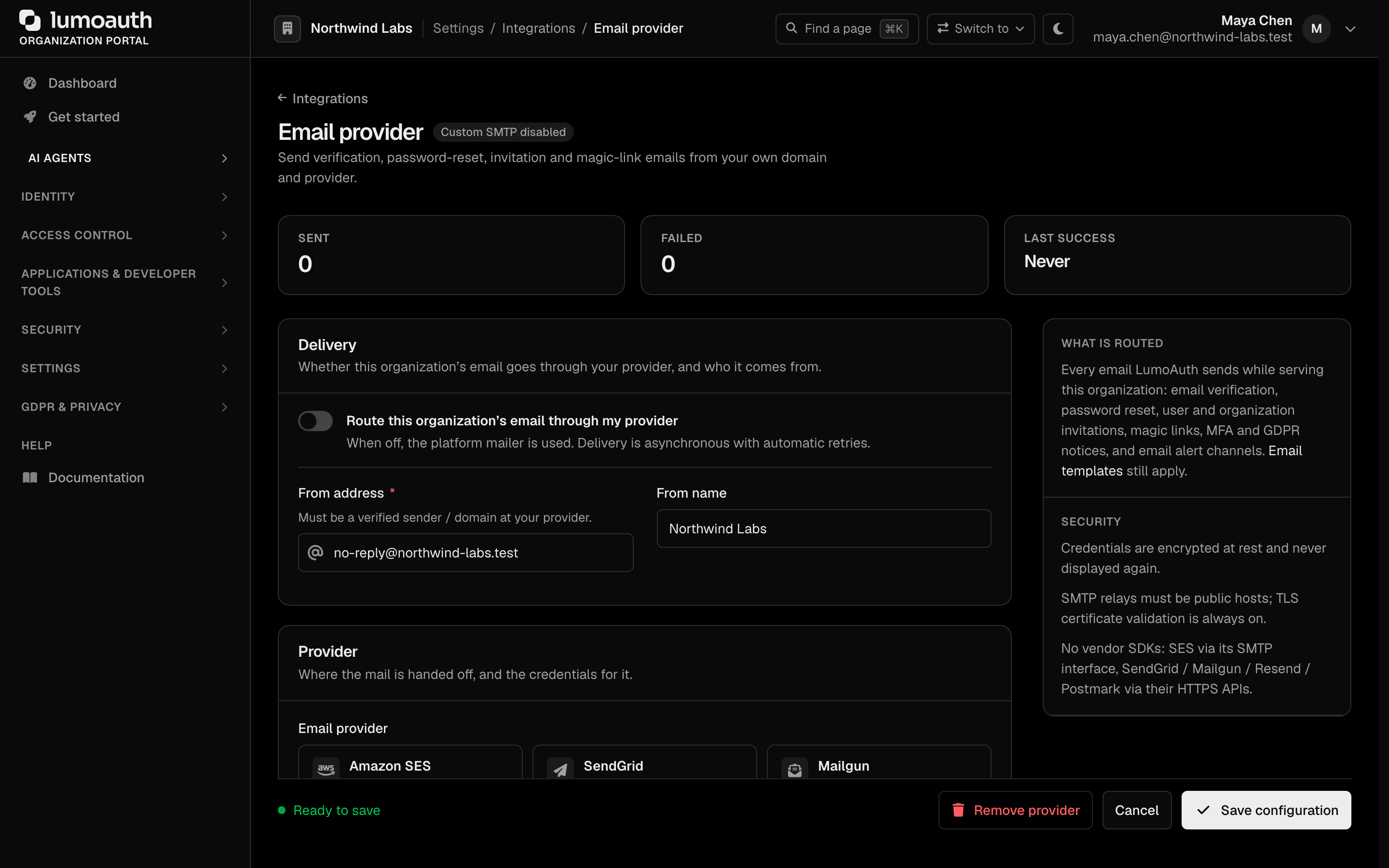
Unless your organization has its own email provider, mail is sent by the platform from a LumoAuth address. With an enabled email provider, the From address you configured there is used.
Related Guides
- User Invitations - Invite users with custom emails
- MFA - Email-based MFA codes
- Account Self-Service - Password reset and verification flows