Webhooks
Webhooks let LumoAuth notify your applications in real time when events occur — authentication events, user changes, security alerts, and more. LumoAuth POSTs a JSON payload to an HTTPS endpoint that you provide and signs each request with HMAC-SHA256 (a keyed hash computed from a shared secret) so your server can verify it.
How Webhooks Work
LumoAuth sends a JSON payload to your configured endpoint for each subscribed event.
Setting Up Webhooks
Via Portal
- In the portal sidebar, open Integrations (
/orgs/{orgId}/portal/integrations) and go to the Webhooks section - Click Add webhook — this opens the form at
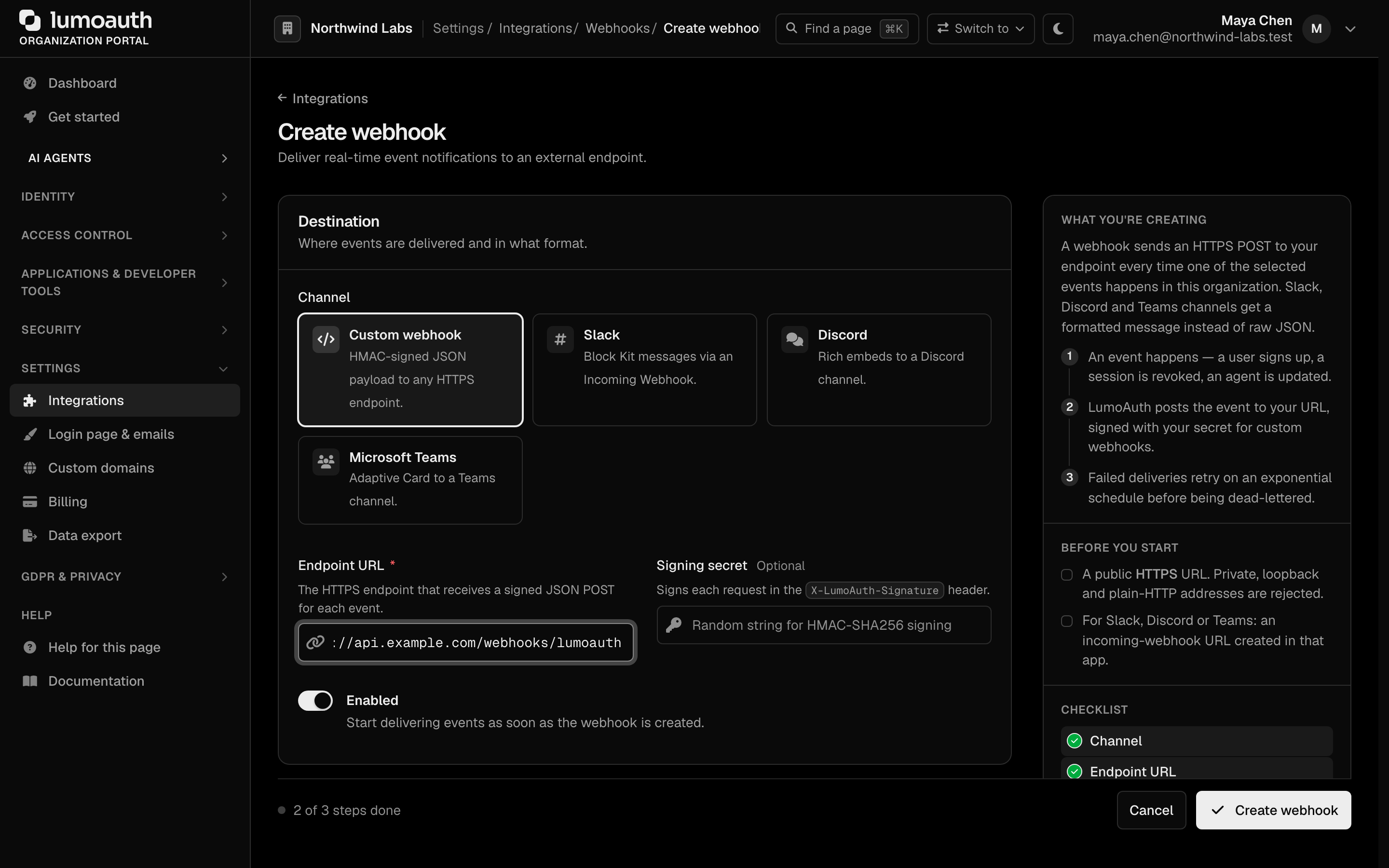
/orgs/{orgId}/portal/integrations/webhooks/create - Configure:
| Field | Description |
|---|---|
| Channel | Custom webhook (HMAC-signed JSON to any HTTPS endpoint), or Slack, Discord or Microsoft Teams, which receive a formatted message instead of raw JSON |
| Endpoint URL | Your HTTPS endpoint for receiving events (see Allowed destinations) |
| Signing secret | Optional shared secret for signature verification (custom webhooks) |
A Slack, Discord or Microsoft Teams webhook URL carries its own secret in the path, so LumoAuth treats it like one. After saving, the list, the edit form, the delivery log and the Admin API show it as https://hooks.slack.com/… (url_masked: true in the API). Leaving the field blank on edit keeps the stored URL, and changing the URL while a signing secret is stored requires re-entering that secret. Delivery error messages are reduced to the destination host.
| Enabled | Enable/disable the webhook |
| Events | Which events to subscribe to. Some plans limit the number of event types per webhook; the form shows the limit |
- Click Create webhook
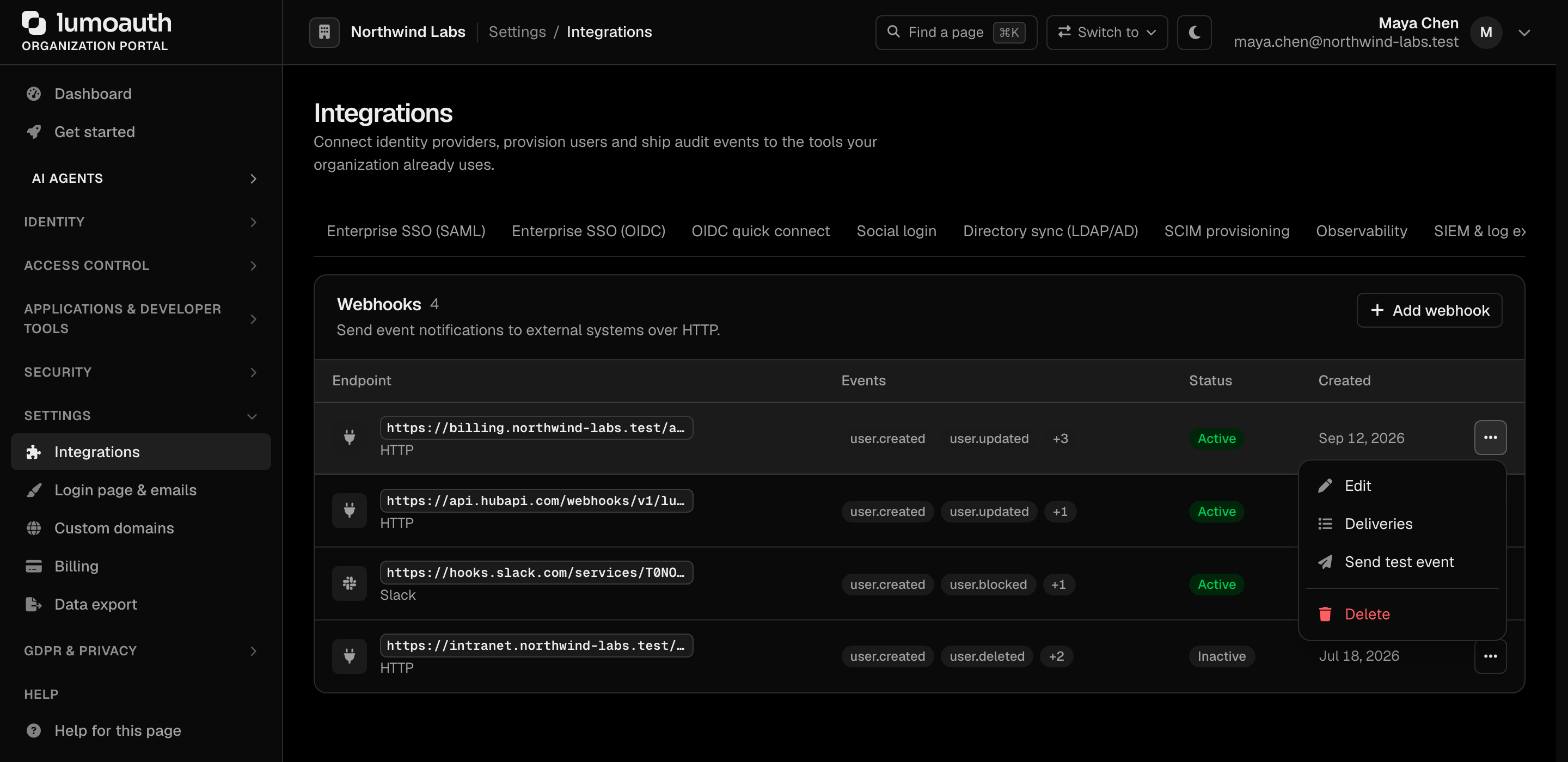
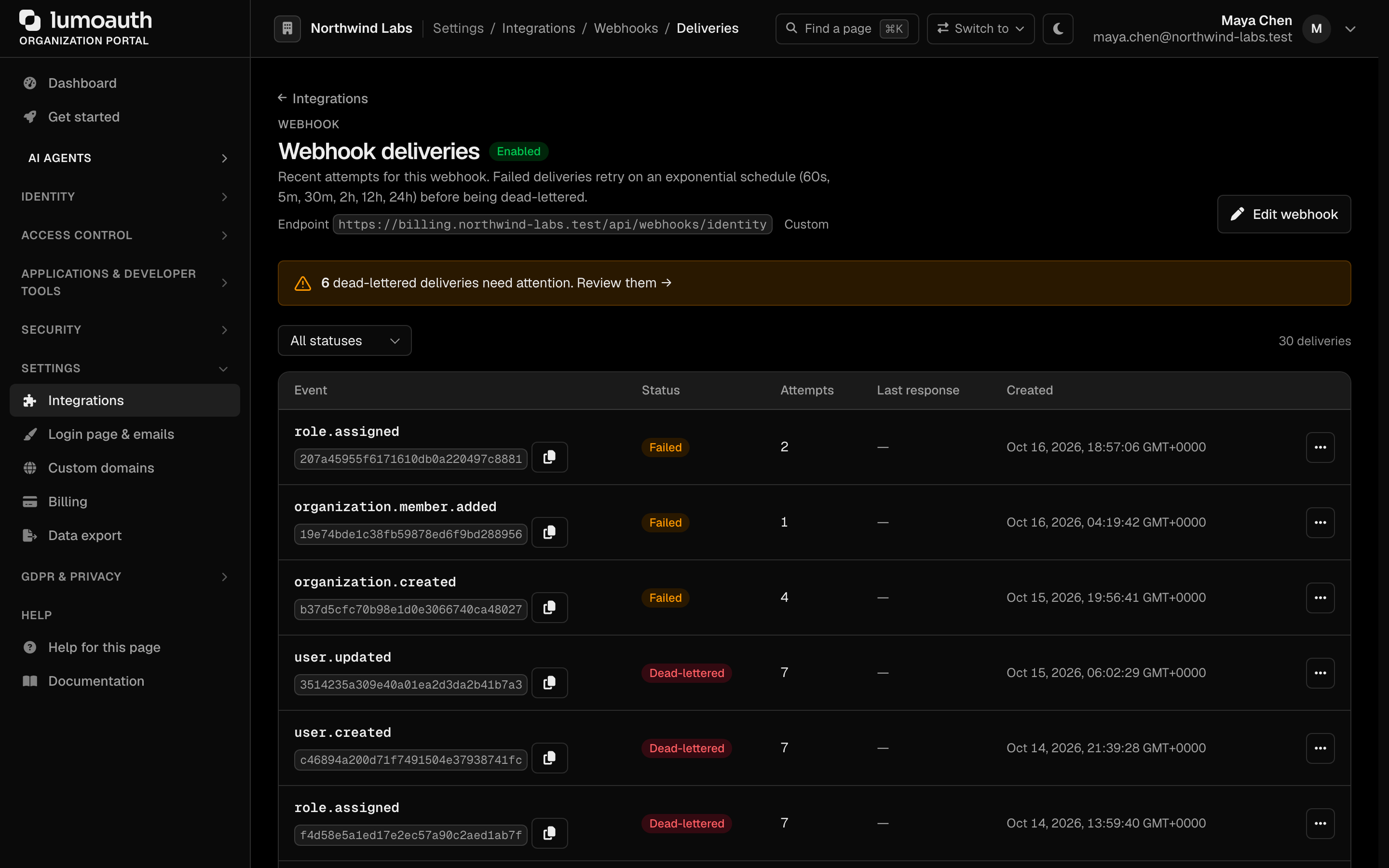
Each webhook in the Webhooks section has an actions menu with Edit, Deliveries, Send test event and Delete. To enable or disable a webhook, or to set a new signing secret, open Edit. Deliveries (/orgs/{orgId}/portal/integrations/webhooks/{id}/deliveries) lists recent attempts with their status and lets you replay failed ones.
Via API
The webhook admin API is mounted under /orgs/{orgId}/api/v1/admin/webhooks:
curl -X POST https://your-domain.com/orgs/{orgId}/api/v1/admin/webhooks \
  -H "Authorization: Bearer {admin_token}" \
  -H "Content-Type: application/json" \
  -d '{
    "url": "https://your-app.com/webhooks/lumoauth",
    "events": ["user.login", "user.login_failed", "user.created"],
    "secret": "your-webhook-secret",
    "active": true
  }'
To fetch the full, authoritative list of event names that you can subscribe to, call:
curl https://your-domain.com/orgs/{orgId}/api/v1/admin/webhooks/events \
  -H "Authorization: Bearer {admin_token}"
Allowed destinations
A webhook URL is checked when it is created, updated and tested. The hostname is also resolved and pinned again before every delivery, so a DNS record cannot be swapped to an internal address between the check and the request. The rules:
| Requirement | Accepted | Rejected |
|---|---|---|
| Scheme | https:// | http://, ftp://, file://, anything else |
| Credentials in the URL | none | https://user:pass@host/ |
| Hostname | A public name that resolves to at least one address, or a public IP literal | localhost, *.localhost, names that do not resolve, names where any A or AAAA record is in a blocked range |
Blocked address ranges (a destination is refused if any resolved address falls in one):
| Range | What it is |
|---|---|
10.0.0.0/8, 172.16.0.0/12, 192.168.0.0/16 | Private network address ranges |
127.0.0.0/8, ::1, :: | Loopback and unspecified |
169.254.0.0/16, fe80::/10 | Link-local; cloud instance metadata is served here |
100.64.0.0/10 | Shared address space / carrier-grade NAT; also cloud metadata on some providers |
0.0.0.0/8, 192.0.0.0/24, 198.18.0.0/15, 240.0.0.0/4 | "This" network, IETF protocol assignments, benchmarking, reserved and broadcast |
192.0.2.0/24, 198.51.100.0/24, 203.0.113.0/24, 2001:db8::/32 | Documentation ranges (TEST-NET-1/2/3) |
192.88.99.0/24, 2002::/16 | 6to4 relay and 6to4 addresses (the embedded IPv4 is checked too) |
64:ff9b::/96, 64:ff9b:1::/48, ::ffff:0:0/96, Teredo 2001::/32 | NAT64, IPv4-mapped and Teredo addresses: the embedded IPv4 is extracted and checked against this table |
fc00::/7, fec0::/10 | IPv6 unique-local and site-local |
224.0.0.0/4, ff00::/8 | Multicast |
The portal reports The webhook URL must be a public HTTPS URL.; the Admin API returns 400 with Webhook URL must not point to a private or internal address. To receive webhooks on a machine inside your network, expose it through a tunnel or reverse proxy with a public hostname.
Available Events
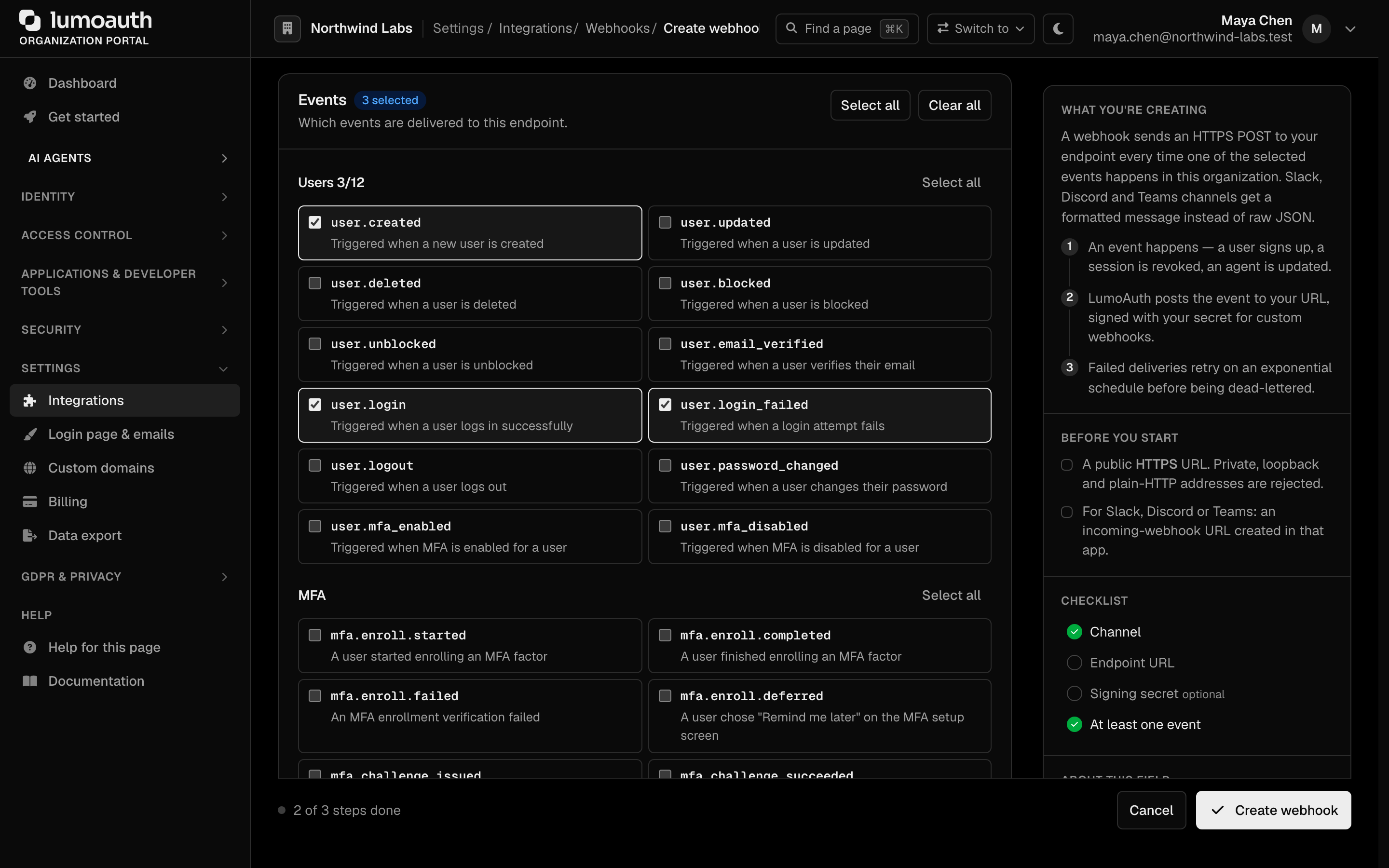
The authoritative list is returned by GET /orgs/{orgId}/api/v1/admin/webhooks/events. In the portal, the Events section of the webhook form groups the same events by category, with Select all / Clear all shortcuts. The current catalog:
User Events
user.created- New user createduser.updated- User updateduser.deleted- User deleteduser.blocked- User blockeduser.unblocked- User unblockeduser.email_verified- User verified their emailuser.login- User logged in successfullyuser.login_failed- A login attempt faileduser.logout- User logged outuser.password_changed- User changed their passworduser.mfa_enabled- A user enrolled their first MFA (multi-factor authentication) factoruser.mfa_disabled- A user no longer has any active MFA factor (the user or an admin removed the last one)
MFA Events
Each MFA audit event is also a webhook event with the same name. The data object carries status, actor_id, actor_name, target_type, target_id (the user id), target_name (the user's email), ip_address, user_agent, severity and metadata (for example authenticator_id, factor_type, purpose, reason).
mfa.enroll.started- A user started enrolling an MFA factormfa.enroll.completed- A user finished enrolling an MFA factormfa.enroll.failed- An MFA enrollment verification failedmfa.enroll.deferred- A user chose "Remind me later" on the MFA setup screenmfa.challenge.issued- An MFA challenge was issuedmfa.challenge.succeeded- An MFA challenge was passedmfa.challenge.failed- An MFA challenge failedmfa.push.denied- A push sign-in request was denied in the appmfa.push.reported_fraud- A user reported a push sign-in request as "This wasn't me" — route this to your security teammfa.factor.removed- An MFA factor was removed (by the user or an admin)mfa.factor.default_changed- A user changed their default MFA factormfa.recovery_codes.generated- Recovery codes were generated or regeneratedmfa.recovery_code.used- A recovery code was used to sign inmfa.recovery.started- Account recovery startedmfa.recovery.completed- A recovered user finished re-enrolling (new factor and recovery codes)mfa.tap.issued- An admin issued a temporary access codemfa.locked- MFA was locked after too many failuresmfa.policy.changed- The organization MFA policy changedmfa.trusted_device.added- A user trusted a device to skip MFAmfa.trusted_device.revoked- A trusted device was revoked
{
  "event": "mfa.push.reported_fraud",
  "timestamp": "2026-09-24T10:30:00Z",
  "tenant": "acme-corp",
  "data": {
    "status": "failure",
    "target_type": "user",
    "target_id": "0192a3f4-…",
    "target_name": "alice@acme.com",
    "severity": "warning",
    "metadata": {
      "factor_type": "push",
      "authenticator_id": "push:5",
      "initiating_ip": "198.51.100.23",
      "location": "Lagos, NG",
      "user_agent": "Mozilla/5.0 …",
      "reason": "user_reported_not_me"
    }
  }
}
Identity & Consent Events
identity.linked- A social identity was linkedidentity.unlinked- A social identity was unlinkedconsent.granted- A user granted consent to an OAuth clientconsent.revoked- A user revoked consentsession.revoked- A session was revoked
Client & Token Events
client.created- OAuth client createdclient.updated- OAuth client updatedclient.deleted- OAuth client deletedclient.secret_rotated- OAuth client secret rotatedtoken.issued- An access token was issuedtoken.revoked- A token was revoked
Access-Control Events
role.assigned- A role was assigned to a userrole.unassigned- A role was removed from a usergroup.member_added- A user was added to a groupgroup.member_removed- A user was removed from a group
Organization Events
organization.created/organization.updated/organization.deletedorganization.member.added/organization.member.removed/organization.member.updatedorganization.invitation.accepted- An organization invitation was accepted
Agent & JIT Events
agent.created- A new agent was registeredagent.updated- An agent was updatedagent.revoked- An agent was revokedagent.attestation.accepted/agent.attestation.rejected- Agent attestation resultjit.approval_required- A JIT permission request needs human approvaljit.request.approved/jit.request.denied- A JIT permission request was resolved
Diagnostics
webhook.test- Fired manually from the portal/API to verify endpoint connectivity
Webhook Payload
Each delivery POSTs a JSON body with this envelope:
{
  "event": "user.login",
  "timestamp": "2025-02-01T14:30:00Z",
  "tenant": "acme-corp",
  "data": {
    "user_id": "user-uuid",
    "email": "alice@acme.com",
    "ip_address": "192.168.1.100"
  }
}
The event type is in the top-level event field, the organization slug is in tenant, and the event-specific fields are in data. The unique delivery identifier is not in the body — it is sent in the X-LumoAuth-Delivery header (see below).
Every request also carries these headers:
| Header | Description |
|---|---|
X-LumoAuth-Event | The event name (matches the body's event) |
X-LumoAuth-Timestamp | Unix timestamp (seconds) when the request was signed |
X-LumoAuth-Delivery | Unique delivery ID — use it for idempotency / replay detection |
X-LumoAuth-Signature | HMAC signature (see below) |
Signature Verification
When a webhook has a secret configured, each request is signed. The X-LumoAuth-Signature header is a comma-separated set of fields:
X-LumoAuth-Signature: kid=v1,t=1706400000,id=<deliveryId>,v1=<hmac>
| Field | Meaning |
|---|---|
kid | Signing-key version (v1, or v2 after the secret has been rotated) |
t | Unix timestamp (matches X-LumoAuth-Timestamp) |
id | Delivery ID (matches X-LumoAuth-Delivery) |
v1 | HMAC-SHA256(secret, "{t}.{id}.{rawBody}"), hex-encoded |
The HMAC is computed over the signing base {timestamp}.{deliveryId}.{rawRequestBody} — not the raw body alone. Verify it like this:
const crypto = require('crypto');

function verifyWebhook(rawBody, signatureHeader, secret) {
  // Parse "kid=..,t=..,id=..,v1=.." into a map
  const parts = Object.fromEntries(
    signatureHeader.split(',').map((kv) => {
      const i = kv.indexOf('=');
      return [kv.slice(0, i), kv.slice(i + 1)];
    })
  );

  const signingBase = `${parts.t}.${parts.id}.${rawBody}`;
  const expected = crypto
    .createHmac('sha256', secret)
    .update(signingBase)
    .digest('hex');

  const a = Buffer.from(parts.v1 || '', 'hex');
  const b = Buffer.from(expected, 'hex');
  return a.length === b.length && crypto.timingSafeEqual(a, b);
}
Reject requests whose t is far from your own clock, and de-duplicate on id (the delivery ID) so a replayed request is only processed once. Always verify against the raw bytes of the request body — re-serializing the parsed JSON can change byte order and break the HMAC.
Retry Policy
| Scenario | Behavior |
|---|---|
| 2xx response | Success, no retry |
| Non-2xx response | Retry with exponential backoff |
| Timeout (5 s) | Retry |
| Retry schedule | 60s, 5m, 30m, 2h, 12h, 24h, then the delivery is dead-lettered (shown on the deliveries page, where it can be replayed) |
| Repeated failures | The webhook stays enabled; watch the Deliveries page and disable it yourself from Edit if the endpoint is gone |
Troubleshooting
400"must not point to a private or internal address" for a public hostname. One of its DNS records (often an AAAA record) points into a blocked range, or the name resolves to nothing from the LumoAuth host. Check every record, not just the A record.- A URL that saved before now fails the test delivery. The blocked list was extended (CGNAT
100.64.0.0/10, TEST-NET, 6to4, NAT64 and multicast ranges). Move the endpoint to a public address. http://URL refused. Onlyhttps://is accepted for webhook endpoints.
Related Guides
- Audit Logs - Historical event records
- Adaptive MFA - Security event triggers
- Observability - Monitoring and metrics
Standards used on this page
| Plain name | Standard |
|---|---|
| Private network address ranges | RFC 1918 |
See the standards reference for what each one covers and how LumoAuth uses it.