Zanzibar (Relationship-Based Authorization)
Zanzibar is the relationship-based authorization model described in Google's 2019 paper. Instead of assigning roles globally, Zanzibar stores relation tuples of the form object#relation@subject — for example document:readme#editor@user:alice ("alice is an editor of document readme"). An authorization check asks "is there a path in the relation graph from this subject to this object under this relation, given the schema's rewrite rules?".
Use Zanzibar when access is driven by hierarchy and relationships: folders containing files, teams owning projects, organizations containing workspaces. Inheritance and sharing are natural in Zanzibar and awkward to express in RBAC (role-based access control). Examples are "editors of a folder can edit its documents" and "all members of this team can view this document".
Relationship-based access control (feature zanzibar) is part of the Fine-grained authorization add-on — $99/month, available on the Pro and Business plans, together with ABAC (attribute-based access control). No plan includes it; buy it under Billing → Add-ons (see the pricing matrix). When billing is enforced (BILLING_ENFORCEMENT=enforce, the production default) and the organization doesn't have the add-on:
- every check denies (
allowed: false), including MCP per-tool grants; - the portal shows an upgrade notice on the Relationships pages, and creating or editing a namespace or creating a tuple redirects to the upgrade page;
- AI policy authoring rejects a policy that contains relations with
403and{"error": "feature_not_in_plan", "feature": "zanzibar", "upgrade": …}.
The RBAC → Zanzibar Sync from roles keeps working. Under BILLING_ENFORCEMENT=log checks are allowed and logged as billing.would_deny; an install with neither Stripe nor a license is not restricted.
What is Zanzibar?
Zanzibar stores relationships between subjects and objects. Each relationship is a single tuple. A check searches the graph formed by those tuples, following the schema's userset rewrites.
| Traditional RBAC | Zanzibar |
|---|---|
| "Alice is an editor" (globally) | "Alice is an editor of Document X" |
| "Bob is a viewer" (globally) | "Bob is a member of Team A, and Team A has view access on Project Y" |
This answers fine-grained, per-object questions:
- "Can Alice edit this specific document?"
- "Can Bob view this project because his team has access?"
- "Who can access this file?"
Core Concepts
Relation Tuples
A relation tuple is the fundamental unit of Zanzibar. It describes a relationship between a subject and an object:
object#relation@subject
| Component | Description | Example |
|---|---|---|
| Object | The resource (namespace:id) | document:readme |
| Relation | The type of relationship | editor |
| Subject | A user or a userset | user:alice or group:eng#member |
Example tuples:
document:readme#editor@user:alice          # Alice is editor of readme
document:readme#viewer@group:engineering   # Engineering group can view readme
folder:docs#owner@user:bob                 # Bob owns the docs folder
team:backend#member@user:carol             # Carol is a member of backend team
A subject can be a concrete identity (user:alice) or a userset — a reference to every entity holding a given relation on another object, written object#relation. For example group:engineering#member means "every user who is a member of group:engineering". Userset subjects let you grant access to whole groups in a single tuple.
Namespace Definitions
A namespace defines the valid relations for a type of object and how each one is computed. The schema is a JSON object with a single relations key. The Create namespace form builds it for you, and its Document sharing example produces this:
{
  "relations": {
    "parent": { "_this": { "relation": "parent" } },
    "owner":  { "_this": { "relation": "owner" } },
    "editor": {
      "union": [
        { "computed_userset": { "relation": "owner" } },
        { "_this": { "relation": "editor" } }
      ]
    },
    "viewer": {
      "union": [
        { "computed_userset": { "relation": "editor" } },
        { "_this": { "relation": "viewer" } },
        { "tuple_to_userset": {
            "tupleset": { "relation": "parent" },
            "computed_userset": { "relation": "viewer" } } }
      ]
    }
  }
}
This declares:
parent,owner,editorandviewerare valid relations for documents._thismeans "the subjects stored directly in tuples for this relation".editor= every owner (computed_userset) OR anyone stored as an editor.viewer= every editor OR anyone stored as a viewer OR (tuple_to_userset) every viewer of the document'sparentobject, so a folder's viewers can see its documents.- Each relation is one of
_this,computed_userset,tuple_to_userset,unionorintersection; any other key is rejected when the namespace is saved.
Check
The core operation is Check — "does subject S have relation R on object O?" The engine searches the graph, following rewrite rules, and returns a yes/no. Run it from the portal Tester or via the Check API.
The original Zanzibar paper also describes an Expand operation ("the full tree of subjects holding a relation on an object"). LumoAuth exposes Check and Expand (POST /orgs/{orgId}/api/v1/zanzibar/expand with object and relation, returning a tree). The portal tester shows the same tree under Where it comes from. There is no list-objects operation.
Permission Inheritance
Relations compose through the graph. Given:
folder:docs#owner@user:bob
folder:docs#parent@folder:root
document:readme#parent@folder:docs
and a schema rule "folder owners can view all documents in the folder", Bob can view document:readme — the check follows the parent edges up the tree.
Managing Zanzibar
Portal
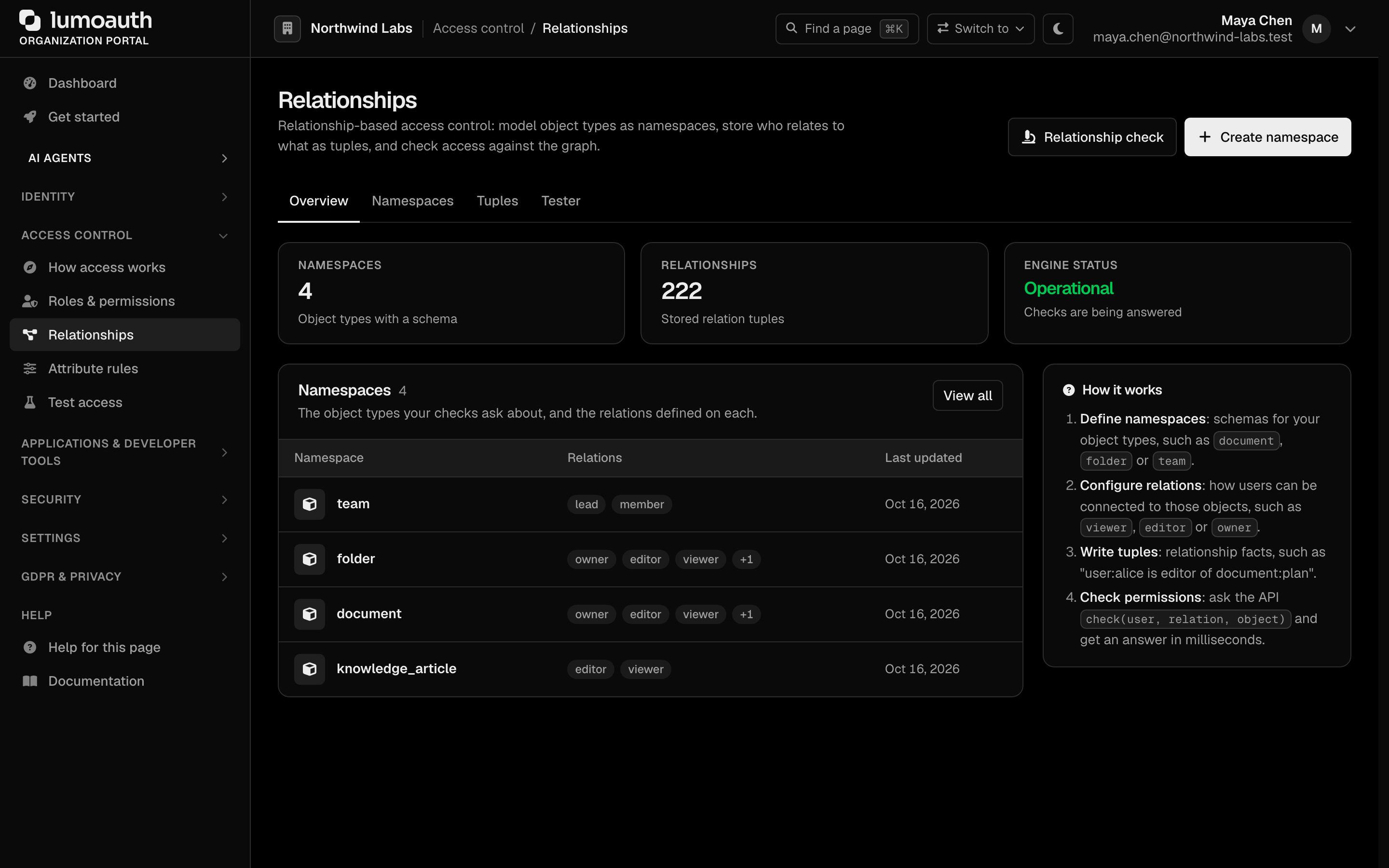
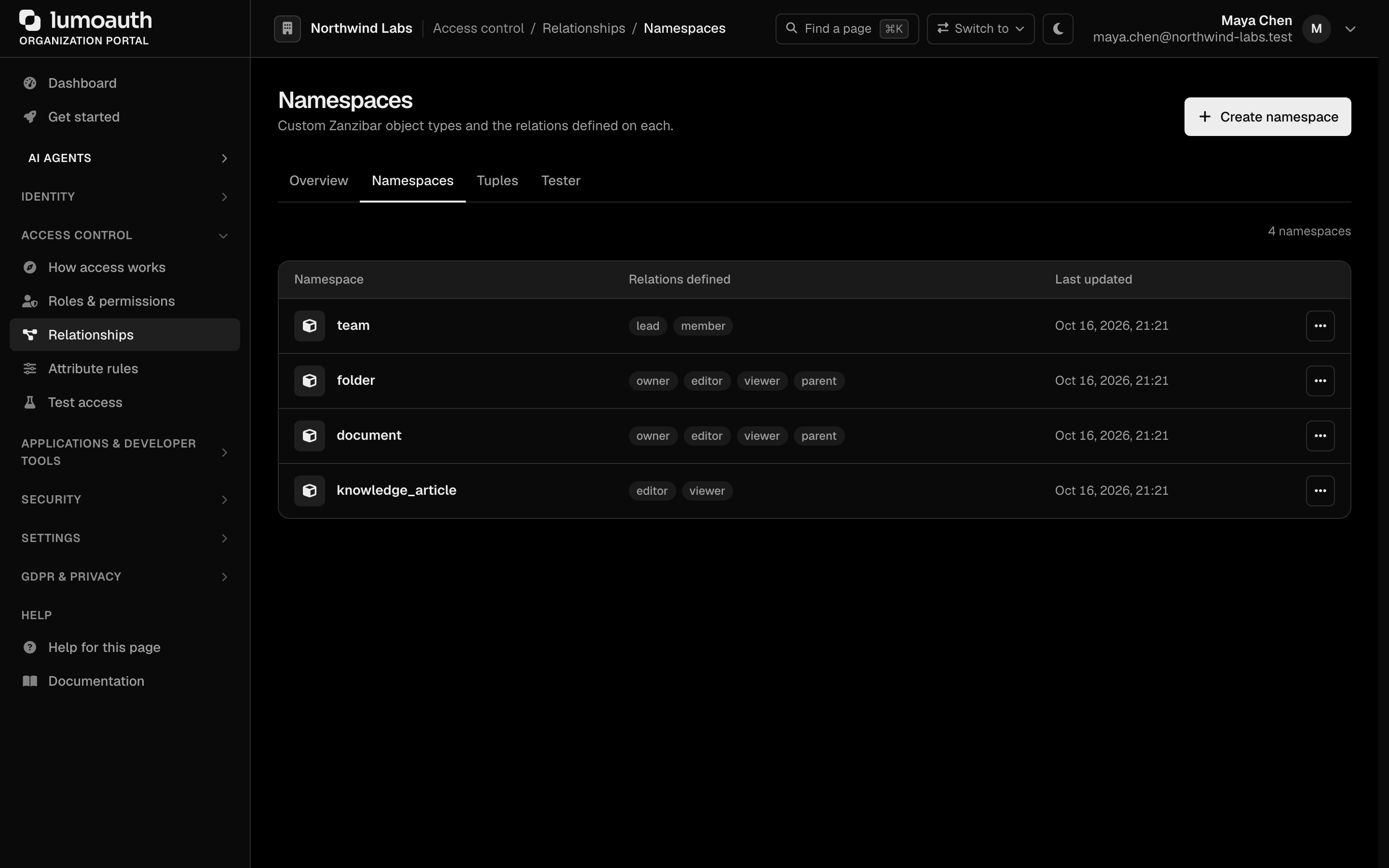
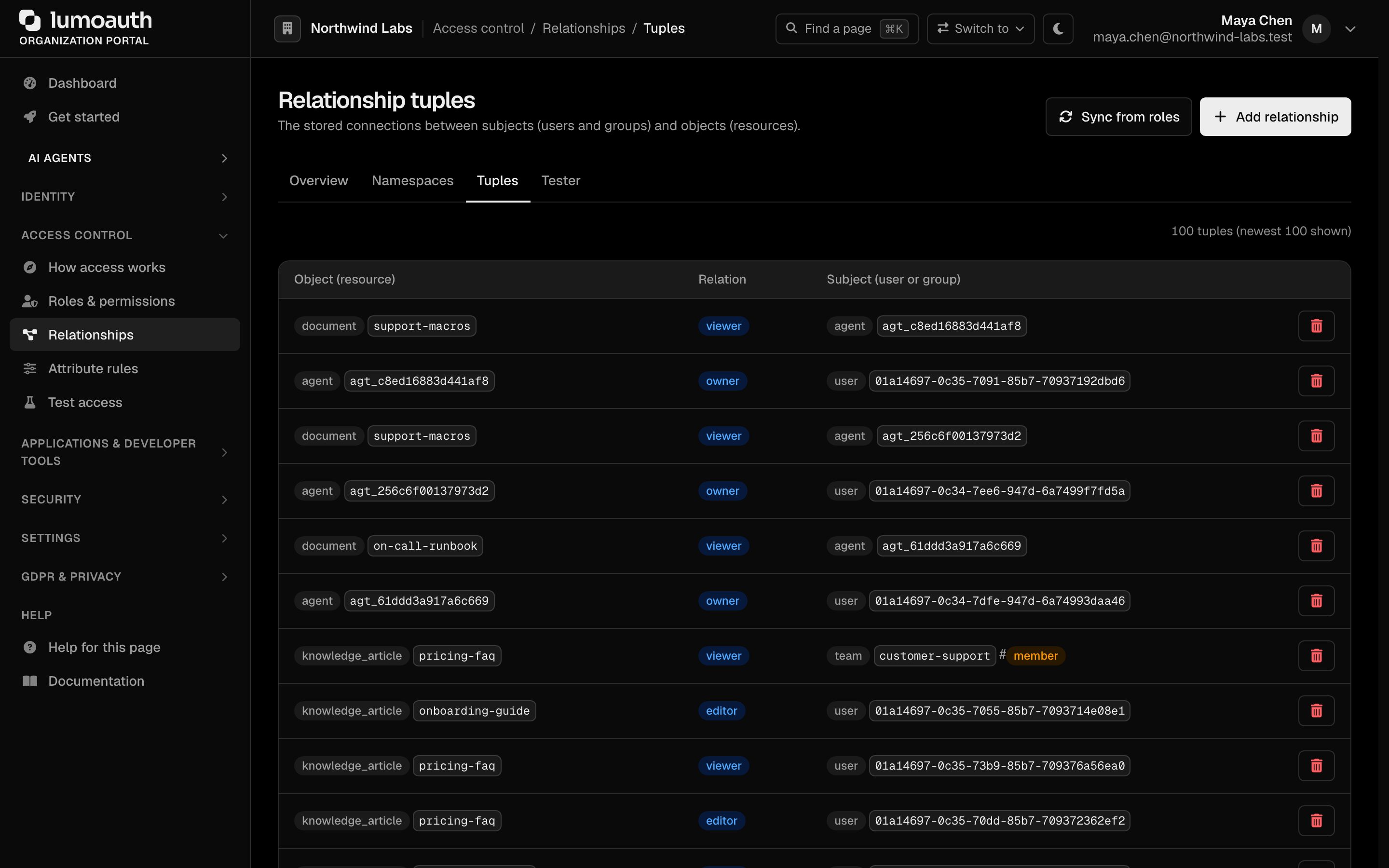
In the sidebar, under Access control, open Relationships (/orgs/{orgId}/portal/zanzibar/). The page has four tabs:
- Overview — counts of namespaces and stored tuples, and the engine status.
- Namespaces — define object types and their relations (
/zanzibar/namespaces). The list shows each namespace with its relations and when it was last updated; the row menu (...) edits or deletes it. - Tuples — create and manage relationships; Sync from roles generates tuples from your roles and permissions (
/zanzibar/tuples). - Tester — run a Check ("does subject S have relation R on object O?") against the relation graph (
/zanzibar/tester).
The header carries Relationship check (opens the Tester) and Create namespace.
Creating Relation Tuples
A tuple needs a namespace with the relation that you want to grant, so create the namespace first (Create namespace).
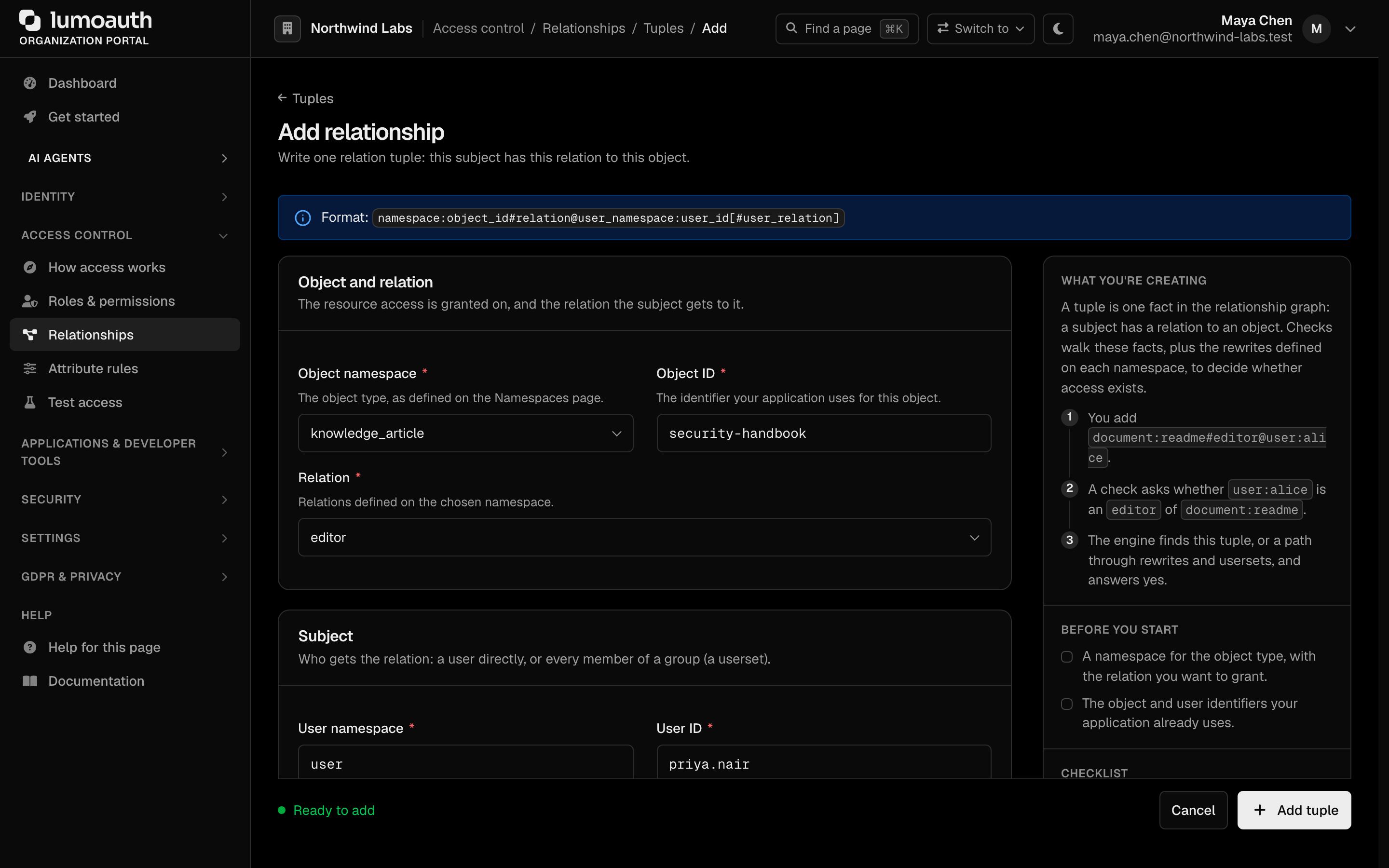
- Go to
/orgs/{orgId}/portal/zanzibar/tuples(the Tuples tab). - Click Add relationship.
- Enter:
- Object namespace and Object ID — the resource (e.g.,
documentandreadme). - Relation — one of the relations defined on that namespace (e.g.,
editor). - User namespace and User ID — the subject (e.g.,
userandalice). - User relation — optional; set it to make the subject a userset (e.g.,
group,engineeringandmemberforgroup:engineering#member).
- Object namespace and Object ID — the resource (e.g.,
- Click Add tuple. The tuple appears in the Tuples list, where Revoke relationship removes it again. Wildcards (
*) are not accepted in the Object ID.
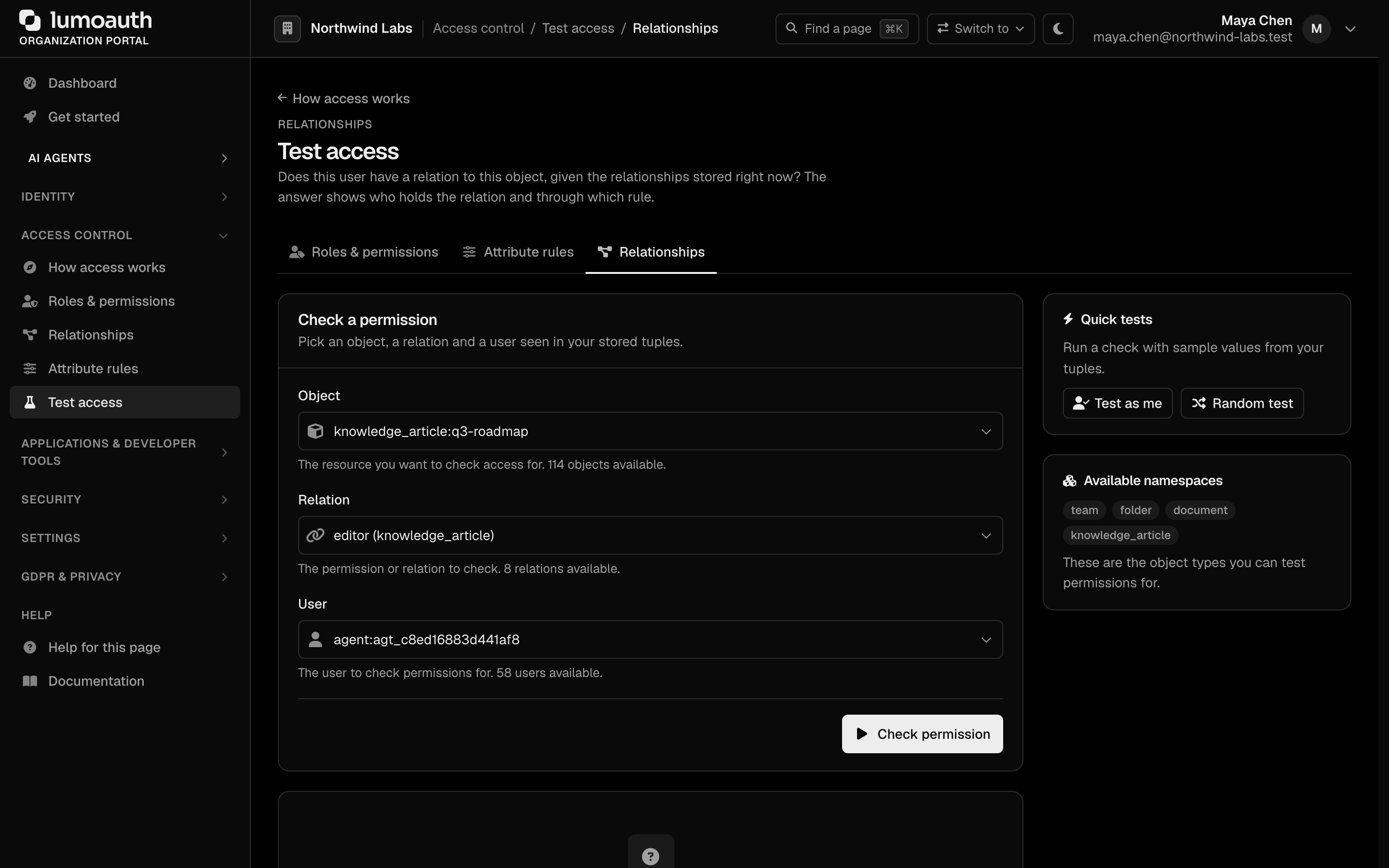
To verify the result, open the Tester tab, pick an object, a relation and a user from your stored tuples, and click Check permission. Quick tests fills the form from your tuples for you: Test as me and Random test.
Via API
Tuples (writes) are managed through the portal — create them at /orgs/{orgId}/portal/zanzibar/tuples/create or generate them from your roles with the Sync from roles action. There is no public REST endpoint for tuple writes or list-objects.
The REST API exposes Check and Expand. The relation field takes any relation defined on the namespace. The engine resolves relations computed from others (editor above, which includes every owner).
A caller may always check itself. Checking any other subject (another user, an agent or a userset) needs the authz.check permission or the authz:check API-key scope. Otherwise the API answers 403 with "code": "insufficient_permissions".
# Check a relation (tenant-scoped)
curl -X POST https://your-domain.com/orgs/{orgId}/api/v1/zanzibar/check \
  -H "Authorization: Bearer {access_token}" \
  -H "Content-Type: application/json" \
  -d '{
    "object": "document:readme",
    "relation": "editor",
    "user": "user:alice"
  }'
# Response: {"allowed": true, ...}

# Expand: who holds a relation on an object, as a tree
curl -X POST https://your-domain.com/orgs/{orgId}/api/v1/zanzibar/expand \
  -H "Authorization: Bearer {access_token}" \
  -H "Content-Type: application/json" \
  -d '{"object": "document:readme", "relation": "viewer"}'
# Response: {"tree": {"type": "union", "object": "document:readme", "relation": "viewer", "children": [...], "subjects": [...]}}
There is also a global authorization route, POST /api/v1/authz/zanzibar/check, with the same object and relation fields but using subject instead of user:
curl -X POST https://your-domain.com/api/v1/authz/zanzibar/check \
  -H "Authorization: Bearer {access_token}" \
  -H "Content-Type: application/json" \
  -d '{
    "object": "document:readme",
    "relation": "editor",
    "subject": "user:alice"
  }'
The canonical Zanzibar check route is the organization-scoped
POST /orgs/{orgId}/api/v1/zanzibar/check (used throughout this page). The other
two are variants: POST /api/v1/zanzibar/check is a deprecated alias without
a tenant in the path, and POST /api/v1/authz/zanzibar/check is the unscoped variant that the
JavaScript/TypeScript SDKs use. Prefer the canonical route.
Note the field name: /orgs/{orgId}/api/v1/zanzibar/check and
/api/v1/zanzibar/check use user, while /api/v1/authz/zanzibar/check
uses subject. All three use relation (not permission). The wrong field
name returns 400: /api/v1/authz/zanzibar/check answers with "code": "MISSING_FIELDS", the other two with an error message listing the missing fields.
Examples
Google Drive-Style Sharing
# Bob owns a folder
folder:shared-docs#owner@user:bob

# Alice can edit files in the folder
folder:shared-docs#editor@user:alice

# The engineering group can view
folder:shared-docs#viewer@group:engineering

# A document is in the folder
document:design-doc#parent@folder:shared-docs
Organization Hierarchy
# Carol is a member of the backend team
team:backend#member@user:carol

# Backend team belongs to the engineering organization
org:engineering#team@team:backend

# Engineering org has access to the production environment
environment:production#accessor@org:engineering#member

# Carol can access production through: team → org → environment
Multi-Organization SaaS
# Acme Corp's workspace
workspace:acme#admin@user:alice
workspace:acme#member@user:bob

# Project within the workspace
project:api-v2#parent@workspace:acme
project:api-v2#lead@user:bob

# Bob is project lead AND workspace member
# Alice is workspace admin, so she can access all projects
Zanzibar vs RBAC
| Aspect | RBAC | Zanzibar |
|---|---|---|
| Granularity | Role-level | Object-level |
| Scale | Hundreds of roles | Large relation graphs |
| Questions answered | "What can this user do?" | "Can this user do X to object Y?" |
| Maintenance | Manage roles and assignments | Manage relation tuples |
| Best for | Application-wide permissions | Per-resource permissions |
Common mistakes
- Every check returns
allowed: falsealthough the tuple exists. The organization doesn't have the Fine-grained authorization add-on and billing is enforced. Add it under Billing → Add-ons (on Developer, upgrade to Pro first); the Relationships pages show the notice. - The Tuples and Namespaces pages show "Upgrade to enable" instead of "Add relationship" / "Create namespace". Same cause: new namespaces and tuples can't be added without the add-on, and opening the create pages by URL redirects to Billing with the add-on preselected.
Best Practices
| Practice | Description |
|---|---|
| Design namespaces carefully | Model domain objects and their natural relationships |
| Use inheritance over duplication | Prefer parent relations to copying tuples |
| Grant to groups, not individuals | Use userset subjects for team access |
| Test on the Tester tab | Verify expected decisions at /orgs/{orgId}/portal/zanzibar/tester (Test access → Relationships) before rolling out |
| Start small | Begin with a few relations, extend as you learn the domain |
Related
- Roles & Permissions — application-wide RBAC.
- Attribute rules (ABAC) — attribute and context conditions.
- AI Policy Authoring — generate relationship namespaces from plain English.
- Access Control Overview — compare all authorization models.