Agent Registry — Microsoft Agent Framework
Connect a LumoAuth agent identity to the Microsoft Agent Framework (Python or .NET). The agent's identity is its registered AGENT_CLIENT_ID in LumoAuth. It authenticates via OAuth 2.0 client credentials (LumoAuthAgent in Python, LumoAgent in .NET). Tools check capabilities before executing. MCP tools swap the base access token for one bound to the MCP server using token exchange. (MCP is the Model Context Protocol, the standard way for agents to call tool servers.)
Set the environment variables LUMOAUTH_URL, LUMOAUTH_ORG_ID,
AGENT_CLIENT_ID, and AGENT_CLIENT_SECRET from your LumoAuth organization portal.
See Agent Registry for registration and credential setup.
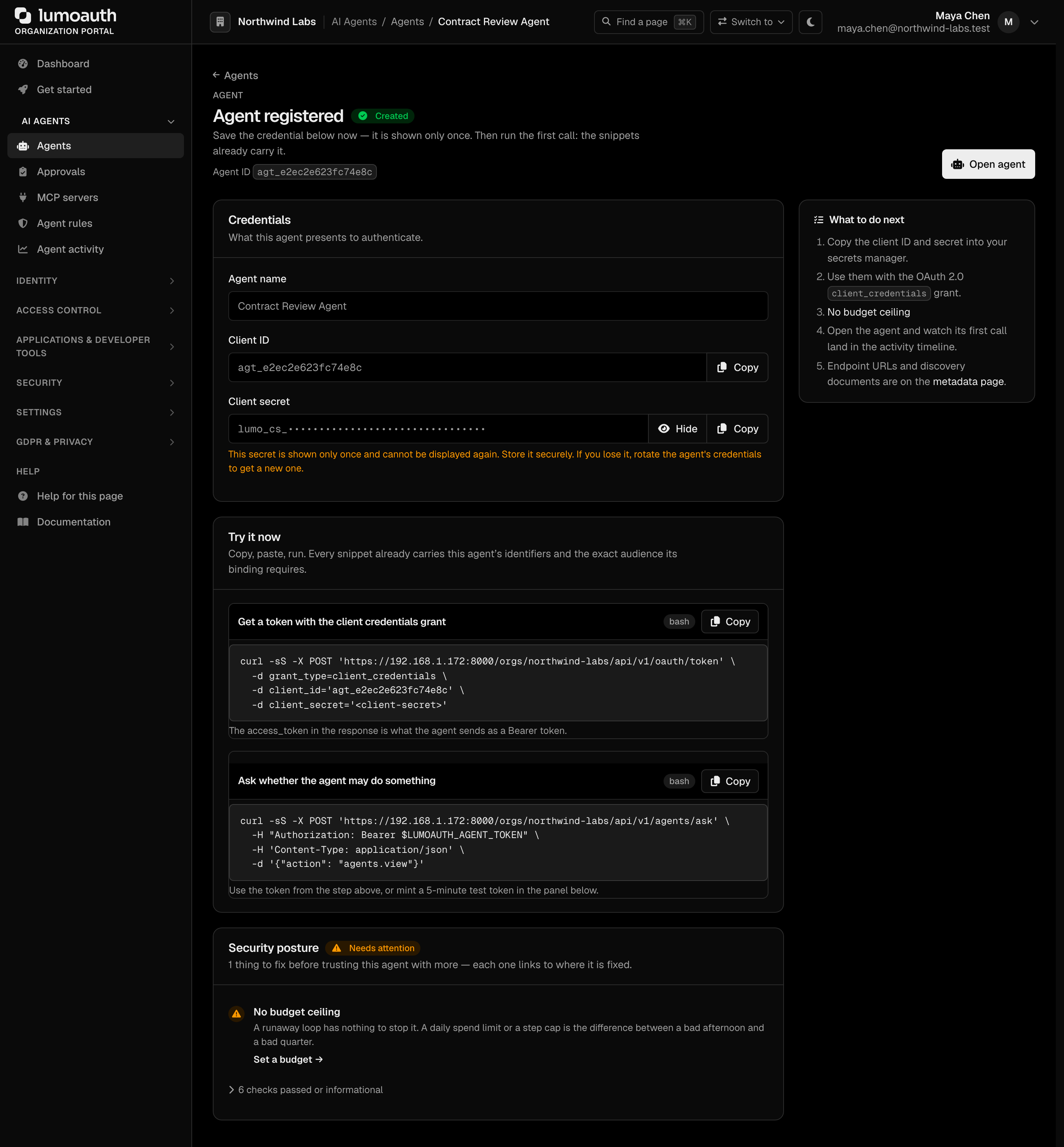
AGENT_CLIENT_ID and AGENT_CLIENT_SECRET are shown once on the Agent created page. That page appears right after you register an agent with the Client ID and secret identity under AI Agents → Agents → Register agent:
Install
- Python
- .NET
pip install agent-framework lumoauth
Python 3.10+ required.
dotnet add package LumoAuth
dotnet add package Microsoft.Agents.AI
dotnet add package Azure.AI.OpenAI
.NET 8 or later for the LumoAuth package; the Microsoft Agent Framework packages need the .NET 10 SDK.
Example
- Python
- .NET
import asyncio
from typing import Annotated
from pydantic import Field
from agent_framework import Agent
from agent_framework.openai import OpenAIChatClient
from lumoauth import LumoAuthAgent

# 1. Authenticate the LumoAuth agent (client-credentials flow)
lumo = LumoAuthAgent()
lumo.authenticate()

# 2. Define tools guarded by LumoAuth capability checks
def search_company_documents(
    query: Annotated[str, Field(description="The search query for company documents")],
) -> str:
    """Search internal company documents for the given query."""
    if not lumo.has_capability("read:documents"):
        return "Error: agent lacks 'read:documents' capability."
    return f"Found 3 documents matching '{query}'"

def query_financial_mcp(
    metric: Annotated[str, Field(description="The financial metric to retrieve")],
) -> str:
    """Query the secured financial metrics MCP server."""
    if not lumo.has_capability("mcp:financial"):
        return "Error: agent lacks 'mcp:financial' capability."
    mcp_token = lumo.get_mcp_token("urn:mcp:financial-data")
    if not mcp_token:
        return "Error: failed to obtain MCP token."
    return f"Retrieved {metric}: $1.2M (authenticated via MCP token exchange)"

# 3. Abort early if the agent's daily budget is exhausted
if lumo.is_budget_exhausted():
    raise RuntimeError("Agent budget exhausted for today.")

# 4. Create the Microsoft Agent Framework agent with LumoAuth-guarded tools
agent = Agent(
    client=OpenAIChatClient(),
    name="Research Analyst",
    instructions="You are a senior analyst. Use tools to search documents and query financial metrics.",
    tools=[search_company_documents, query_financial_mcp],
)

# 5. Run the agent
async def main():
    response = await agent.run(
        "Search documents for Q3 performance, then query the financial MCP for EBITDA."
    )
    print(response)

if __name__ == "__main__":
    asyncio.run(main())
using System.ComponentModel;
using Azure.AI.OpenAI;
using Azure.Identity;
using LumoAuth;
using Microsoft.Agents.AI;
using Microsoft.Extensions.AI;

// 1. Authenticate the LumoAuth agent (client-credentials flow). Reads
//    LUMOAUTH_URL, LUMOAUTH_ORG_ID, AGENT_CLIENT_ID and AGENT_CLIENT_SECRET;
//    the token is fetched on first use and refreshed for you.
var lumo = LumoAgent.FromEnvironment();

// 2. Abort early if the agent's daily budget is exhausted.
await lumo.CheckBudgetAsync();   // throws LumoAuthBudgetExceededException

// 3. Tools guarded by LumoAuth capability checks.
[Description("Search internal company documents for the given query.")]
async Task<string> SearchCompanyDocuments([Description("Search query")] string query) =>
    await lumo.HasCapabilityAsync("read:documents")
        ? $"Found 3 documents matching '{query}'"
        : "Error: agent lacks 'read:documents' capability.";

[Description("Query the secured financial metrics MCP server.")]
async Task<string> QueryFinancialMcp([Description("The financial metric")] string metric)
{
    if (!await lumo.HasCapabilityAsync("mcp:financial"))
        return "Error: agent lacks 'mcp:financial' capability.";
    // 4. Token exchange → a token bound to the MCP server.
    string mcpToken = await lumo.McpTokenAsync("urn:mcp:financial-data");
    return $"Retrieved {metric}: $1.2M (authenticated via MCP token exchange)";
}

// 5. Build the Microsoft Agent Framework agent. .AsAIAgent + AIFunctionFactory
//    are the framework-specific glue. Use ManagedIdentityCredential in prod.
AIAgent agent = new AzureOpenAIClient(
        new Uri(Environment.GetEnvironmentVariable("AZURE_OPENAI_ENDPOINT")!),
        new DefaultAzureCredential())
    .GetChatClient(Environment.GetEnvironmentVariable("AZURE_OPENAI_DEPLOYMENT_NAME") ?? "gpt-4o-mini")
    .AsAIAgent(
        name: "Research Analyst",
        instructions: "You are a senior analyst. Use tools to search documents and query financial metrics.",
        tools:
        [
            AIFunctionFactory.Create(SearchCompanyDocuments, name: nameof(SearchCompanyDocuments)),
            AIFunctionFactory.Create(QueryFinancialMcp,      name: nameof(QueryFinancialMcp)),
        ]);

// 6. Run it.
Console.WriteLine(await agent.RunAsync(
    "Search documents for Q3 performance, then query the financial MCP for EBITDA."));
Set the required environment variables before running:
LUMOAUTH_URL=https://app.lumoauth.dev
LUMOAUTH_ORG_ID=your-organization-slug
AGENT_CLIENT_ID=your-agent-client-id
AGENT_CLIENT_SECRET=your-agent-client-secret
AZURE_OPENAI_ENDPOINT=https://your-resource.openai.azure.com/
AZURE_OPENAI_DEPLOYMENT_NAME=gpt-4o-mini
dotnet run
How it works
Both samples follow the same flow; only the framework glue differs.
| Step | Python | .NET |
|---|---|---|
| Authenticate (client-credentials) | lumo.authenticate() | LumoAgent.FromEnvironment() (token fetched on first use) |
| Guard a tool | lumo.has_capability(...) | lumo.HasCapabilityAsync(...) |
| Budget check | lumo.is_budget_exhausted() | lumo.CheckBudgetAsync() |
| MCP token (token exchange) | lumo.get_mcp_token(...) | lumo.McpTokenAsync(...) |
| Register tools | annotated functions in tools=[] | AIFunctionFactory.Create(...) |
| Build + run the agent | Agent(...) + await agent.run(...) | .AsAIAgent(...) (from Microsoft.Agents.AI) + agent.RunAsync(...) |
Next steps
- Agent Registry overview — manage registrations, budgets, and capabilities
- AAuth Quickstart — add cryptographic agent identity (AAuth: the agent signs each request with its own key)
- JIT Permissions — just-in-time permissions: request human-in-the-loop approval for sensitive operations
- Workload Federation — authenticate with the identity that Azure Managed Identity already gives the workload, instead of client secrets
Standards used on this page
| Plain name | Standard |
|---|---|
| Token exchange (delegation) | RFC 8693 |
See the standards reference for what each one covers and how LumoAuth uses it.