Just-in-Time (JIT) Permissions
JIT permissions shift the security model from "access by default" to "access by request". Instead of granting broad capabilities upfront, agents request a specific permission at the moment that they need it. LumoAuth returns a short-lived token scoped to exactly that operation (default 10 minutes / 600s, configurable up to 900s via requested_ttl). High-risk operations can be routed through human approval (human-in-the-loop, HITL) before the token is issued.
JIT permissions are granted with the minimum scope and duration needed. All grants are logged for audit and can be revoked at any time.
Do this first
- Register the agent and obtain its credential (an
agk_API key, an agent OAuth token, or a workload attestation token). - Create a task:
POST /orgs/{orgId}/api/v1/jit/task(see Create task). - Request the permission:
POST /orgs/{orgId}/api/v1/jit/requestwith structuredauthorization_details(a rich authorization request: a JSON description of exactly what is needed, instead of a scope string). - If the response is
approved, exchange it attoken_urlfor the JIT token and call your API with it. - If the response is
pending, a human must decide. Make sure at least one person in the organization holds thejit.approvepermission and is not the agent's owner (see Who can approve). Then pollstatus_urlor wait for thecallback_url.
Agent credentials are stateless: every JIT call must carry the credential, no cookie is ever set, and agk_ keys are accepted only on agent, JIT and authz-check routes. See Agent API keys.
Standards and specifications
| Standard | Description | LumoAuth implementation |
|---|---|---|
| Rich authorization requests | Lets clients attach structured JSON authorization_details to a token request instead of opaque scope strings | Full support for authorization_details |
| Token exchange (delegation) | Swap one token for another, recording subject/actor; used here to downscope a broad agent token into a JIT-scoped one | Downscoping tokens with specific authorization_details objects |
| RAR Error Signaling (draft) | Insufficient-Authorization-Details response header that tells the client exactly which RAR object is needed | Used by agents to self-correct |
| CAEP | Continuous Access Evaluation Profile (OpenID). A standard for identity providers to push real-time session-event signals (session revoked, credential change) to relying parties so they can invalidate sessions immediately. | Real-time token revocation on suspicious behavior |
Core concepts
1. Ephemeral personas (task-based identity)
Every agent task gets a unique sub-identity via a task_id. This isolates different workflows, even for the same agent.
{
  "sub": "agent:research-bot:task:task_abc123def456",
  "agent_id": "agt_research-bot",
  "task_id": "task_abc123def456",
  "parent_task_id": null,
  "jit": true,
  "exp": 1706644800,  // 10 minutes from now
  "authorization_details": [{
    "type": "file_access",
    "actions": ["read"],
    "identifier": "report_2024.pdf"
  }]
}
2. Rich authorization details
Instead of generic scopes like files.read, agents request specific authorization using structured JSON objects (rich authorization requests):
{
  "type": "file_access",
  "actions": ["read"],
  "identifier": "report_2024.pdf",
  "locations": ["https://storage.example.com/docs/"]
}
Common authorization types:
| Type | Actions | Description |
|---|---|---|
file_access | read, write, delete | Access to specific files or directories |
api_call | GET, POST, PUT, DELETE | HTTP API operations |
database_query | select, insert, update, delete | Database operations on specific tables |
tool_invocation | execute | Invoking external tools or functions |
payment | initiate, approve | Financial operations (critical: always requires a human) |
user_data | read, export | Access to user PII (critical: always requires a human) |
payment, user_data, credentials and admin_action are critical types: a request for them is always held for a human reviewer, whatever its risk score, the agent's capability allow-list or any approval policy says.
3. Human-in-the-loop (HITL)
High-risk operations pause for human approval before a token is issued:
- Agent to LumoAuth: Request JIT Permission (high-risk)
- LumoAuth to LumoAuth: Assess Risk: HIGH
- LumoAuth to Agent: 202 Pending (request_id, status_url)
- LumoAuth to Admin/User: Push Notification / Webhook
- Agent to LumoAuth: GET /status
- LumoAuth to Agent: status: pending
- Admin/User to LumoAuth: Approve Request
- Agent to LumoAuth: GET /status
- LumoAuth to Agent: status: approved, token_url
- Agent to LumoAuth: POST /token
- LumoAuth to Agent: JIT Access Token (10 min TTL)
- Agent to Protected API: Use Token
4. Token downscoping (token exchange)
Agents start with minimal permissions and exchange their broad token for a narrower JIT token scoped to a single action. The JIT token carries the full authorization_details and has a short TTL.
Token exchange solves the problem of turning one token into another without re-authenticating, while recording who is acting for whom. What you must do: treat the JIT token as the token to present to the resource (issued_token_type is urn:ietf:params:oauth:token-type:access_token) and never reuse the broad agent token for the downscoped call.
API reference
Create task (ephemeral persona)
POST /orgs/{orgId}/api/v1/jit/task
Create a new short-lived task context for the agent.
curl -X POST https://app.lumoauth.dev/orgs/acme-corp/api/v1/jit/task \
  -H "Authorization: Bearer $AGENT_TOKEN" \
  -H "Content-Type: application/json" \
  -d '{
    "name": "Research Task #123",
    "type": "research",
    "on_behalf_of": "alice@example.com"
  }'
{
  "task_id": "task_a1b2c3d4e5f6g7h8",
  "caep_session_id": "caep_xyz789",
  "expires_at": "2026-01-30T15:00:00Z",
  "agent_id": "agt_research-bot",
  "agent": { "agent_id": "agt_research-bot", "name": "Research Bot" },
  "on_behalf_of": "alice@example.com"
}
Returns 201 Created. parent_task_id is accepted for nested tasks.
Delegation and consent. There are two ways that a task can act for a user:
How on_behalf_of was established | delegation_consent_required | What happens to permission requests |
|---|---|---|
Delegation token — the agent authenticated with a token obtained by token exchange for that user (act.sub = agent_…, sub = user). The user already consented when the token was issued. | false | Normal risk evaluation: low-risk requests auto-approve, approval policies apply. |
Asserted — the agent only named the user in the request body ("on_behalf_of": "alice@example.com", allowed when the agent has can act on behalf of users). | true | Always a human decision. The request is never auto-approved and never policy-approved, whatever its risk score or the agent's capabilities. Alice herself consents (no jit.approve needed, audited as jit.delegation_consented) or refuses (jit.delegation_consent_refused), and a reviewer with jit.approve can override a missing consent (jit.delegation_approved_by_reviewer). Alice's consent approves the request outright only when the delegation was the sole reason for human review. If the request also targets a critical resource type (payment, user_data, credentials, admin_action), exceeds the agent's registered capabilities, or was assessed as high or critical risk, her consent is recorded (the API answers 403 access_denied with Your consent has been recorded…). The request then stays pending for a reviewer with jit.approve, who approves it as a normal jit.permission_approved. Consent never substitutes for that review. |
An asserted on_behalf_of must name an active, unblocked user of the
organization. Unknown, inactive and blocked accounts all return the same
400 invalid_request ("User not found or not authorized for delegation").
The named user is notified together with the reviewers (email, push) and sees
the request in GET /jit/pending even without jit.approve. The agent's owner
cannot consent by naming themselves — separation of duties still applies.
Task name/type and every approver-facing string are sanitised at write time
(control, bidirectional-override and zero-width characters removed, lengths
capped).
Request JIT permission
POST /orgs/{orgId}/api/v1/jit/request
Request a specific permission using structured authorization_details.
curl -X POST https://app.lumoauth.dev/orgs/acme-corp/api/v1/jit/request \
  -H "Authorization: Bearer $AGENT_TOKEN" \
  -H "Content-Type: application/json" \
  -d '{
    "task_id": "task_a1b2c3d4e5f6g7h8",
    "authorization_details": {
      "type": "file_access",
      "actions": ["read"],
      "identifier": "report_2024.pdf"
    },
    "justification": "Need to analyze Q4 financial data for user query",
    "requested_ttl": 300,
    "callback_url": "https://agent.example.com/webhook/jit"
  }'
{
  "request_id": "jit_abc123xyz",
  "status": "approved",
  "risk_level": "low",
  "task_id": "task_a1b2c3d4e5f6g7h8",
  "token_url": "/orgs/acme-corp/api/v1/jit/request/jit_abc123xyz/token",
  "granted_ttl": 300
}
{
  "request_id": "jit_def456uvw",
  "status": "pending",
  "risk_level": "high",
  "task_id": "task_a1b2c3d4e5f6g7h8",
  "status_url": "/orgs/acme-corp/api/v1/jit/request/jit_def456uvw/status",
  "expires_at": "2026-01-30T14:05:00Z",
  "delegation_consent_required": false,
  "message": "Request requires human approval. Poll status_url or wait for callback."
}
justification is capped at 1,000 characters and, like the strings inside
authorization_details, sanitised before anyone reads it. (The stored type
keeps your spelling; comparisons are case- and -/:-insensitive.) The
request is also counted against the agent's budget policy: an
exhausted budget returns 429 access_denied ("Agent budget exceeded") here
and on the token endpoint.
Get request status
GET /orgs/{orgId}/api/v1/jit/request/{request_id}/status
Poll for HITL approval status. The body matches the create response:
approved includes token_url + granted_ttl, pending includes
expires_at and delegation_consent_required. A pending request past its
expires_at is reported as expired. Every decided request carries
has_notes (boolean) and agent_message (string or null). Reviewer notes
and denial reasons stay inside the organization; only the message that a
reviewer explicitly writes for the agent is relayed. The same two fields are sent on
the callback_url webhook. review_notes is no longer returned.
Rate limit: 120 status/complete calls per minute per agent.
Exchange for a JIT token
POST /orgs/{orgId}/api/v1/jit/request/{request_id}/token
Exchange an approved request for a short-lived JIT token.
{
  "access_token": "eyJhbGciOiJIUzI1NiIsInR5cCI6IkpXVCJ9...",
  "token_type": "Bearer",
  "expires_in": 300,
  "issued_token_type": "urn:ietf:params:oauth:token-type:access_token",
  "authorization_details": [{
    "type": "file_access",
    "actions": ["read"],
    "identifier": "report_2024.pdf"
  }],
  "task_id": "task_a1b2c3d4e5f6g7h8",
  "jit_request_id": "jit_abc123xyz"
}
A 403 request_not_redeemable means the approval can no longer be turned
into a token. The causes are: the five-minute approval window lapsed, the task
was completed or suspended, the agent or the organization is no longer active,
or the on-behalf-of user was deactivated or blocked. The request is transitioned
to expired (window lapsed) or revoked (everything else) and audited as
jit.token_issuance_refused. Request a new permission instead.
A JIT token may only call GET …/request/{id}/status and
POST …/task/{id}/complete, and only for its own task (its task_id
claim must match). Using it to create tasks, request permissions or exchange
approvals is refused. The firewall answers 401 invalid_token, and the
controller answers 403 jit_principal_not_allowed when the task does not match.
Keep using the agent credential for those calls.
Complete task
POST /orgs/{orgId}/api/v1/jit/task/{task_id}/complete
Mark the task complete and revoke all associated JIT tokens. Approvals that
were never exchanged for a token are retired at the same time (approved →
revoked, pending → expired, audited as jit.requests_retired); CAEP
suspension does the same.
Who can approve
A pending request is decided by a human reviewer, never by the agent. The rules are enforced in one place (JitPermissionService) for every surface: the REST endpoints below, the portal inbox, the mobile device API and the approval channels.
| Rule | What it means |
|---|---|
| Reviewer is a human | GET /jit/pending, POST /jit/approve/{id} and POST /jit/deny/{id} accept only a browser session or a user access token that carries the jit:approve scope. JIT tokens, agent tokens, agk_ keys and delegated tokens (with an act or may_act claim) are refused with 401 invalid_token; organization API keys cannot hold jit:approve. |
Reviewer holds jit.approve | jit.approve is a seeded system permission ("Approve JIT Requests"). Organization admins hold it out of the box. Any other user needs a role that grants it. |
| Reviewer is a user of the same organization | A user from another organization gets 403 insufficient_permissions, even with the permission elsewhere. |
| Not the agent's owner | The user who owns (created) the agent can never approve or deny that agent's requests. A second person with jit.approve is required (separation of duties). The only exemption is a short-lived sandbox organization. |
| Not the on-behalf-of user | The user that the task acts for (on_behalf_of) cannot approve their own request — except when the delegation was merely asserted by the agent (delegation_consent_required: true). Then that user's approval is the consent step: it needs no jit.approve, only an active, unblocked account allowed to use the agent, and is audited as jit.delegation_consented. Consent releases the request only when the delegation was the sole reason for review. A critical resource type, an out-of-capability request or a high/critical risk score still needs a jit.approve reviewer afterwards. See Create task. |
| Not expired | A request past its expires_at cannot be approved, even if it still shows as pending. |
| Delegate still usable | A request made on behalf of a user cannot be approved (or exchanged for a token) once that user is deactivated or blocked. |
| Allowed to use the agent | If the agent restricts which customer organizations may use it (user access mode org_only, b2b_only, b2b_specific), the reviewer must be allowed to use it. This applies on every channel, including the portal and the mobile app, which lists only requests that the reviewer may decide. |
Delegate approval to a reviewer role
Do not hand out admin rights just so people can approve requests. Create a narrow role instead:
- Open Access control → Roles & permissions in the portal (or use the Roles API).
- Create a role such as
Agent reviewer. - Grant it the single permission
jit.approve: in the permission matrix, find Agent approvals in the AI agents group and set it to Full. - Assign the role to the people who should review agent requests. Pick reviewers who do not own the agents that they will review.
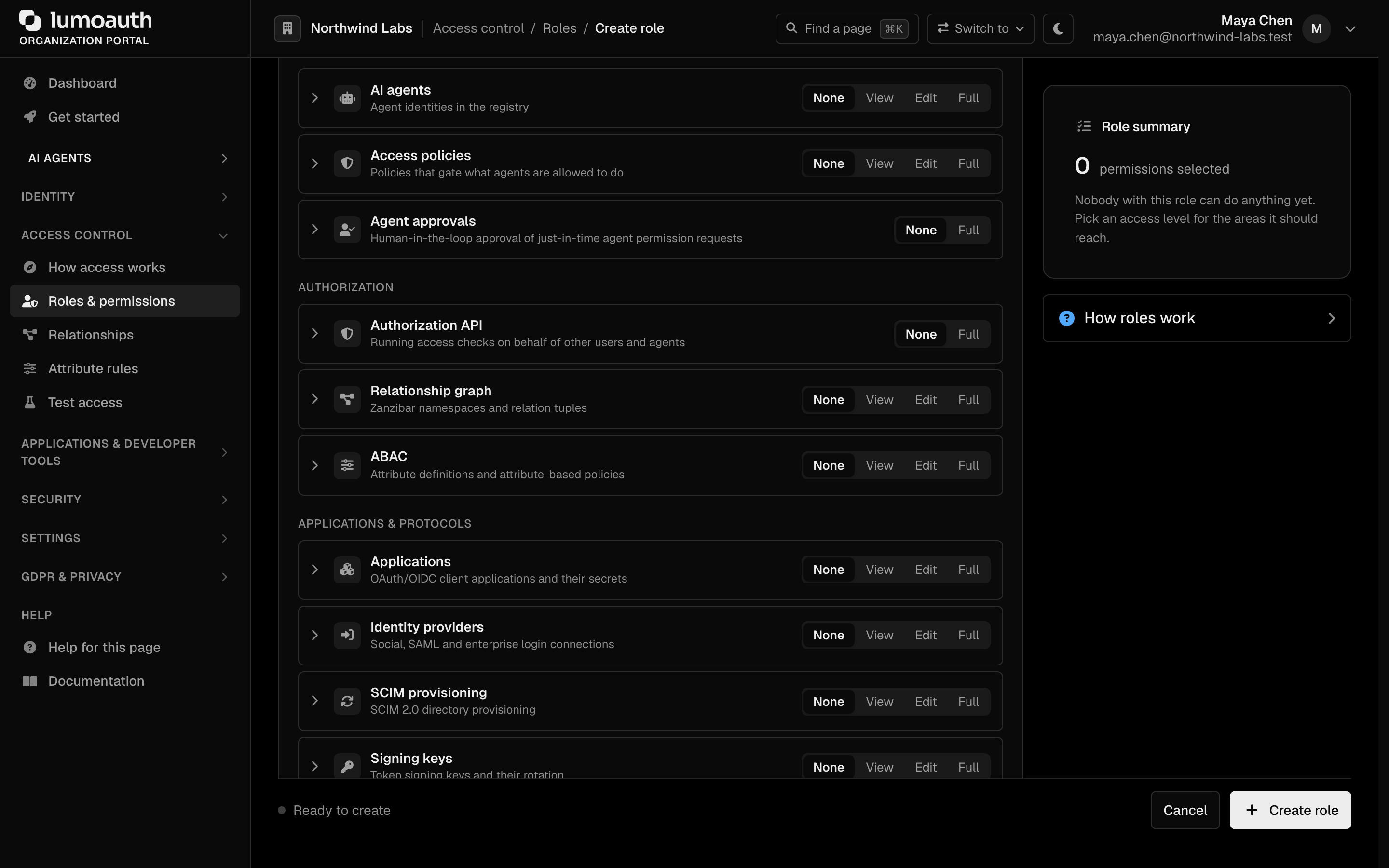
The same permission unlocks the portal approvals inbox, push and mobile approvals, and the approval channels. See Roles and permissions for role management in general and Agent governance for the audit events written on refused reviews.
Approver and supervisory endpoints
The endpoints above are called by the agent (agent bearer token). The following are called by a human reviewer or supervisor, and the caller must satisfy every rule in Who can approve. Two credentials work:
- Browser session on the LumoAuth host (the portal inbox and the
approve_urlin notifications use this). - User access token with the
jit:approvescope, for a reviewer app of your own. Allowjit:approveon the client and request it:scope=openid jit:approve. A user token without it gets403 forbidden(required_scopes: ["jit:approve"]).
curl -X POST https://app.lumoauth.dev/orgs/acme-corp/api/v1/jit/approve/jit_def456uvw \
  -H "Authorization: Bearer $REVIEWER_ACCESS_TOKEN" \
  -H "Content-Type: application/json" \
  -d '{"notes": "Approved for INV-7741"}'
An agent can never approve its own (or another agent's) request: before 2026-09-25 a JIT token authenticated as the agent's human owner on these routes; it is now refused.
List pending approvals
GET /orgs/{orgId}/api/v1/jit/pending
Returns every JIT request awaiting human decision that the caller is allowed to
act on. Requires the jit.approve permission. A user without it still gets
the delegations that name them and still need their consent
(your_consent_required: true), and 403 insufficient_permissions when there
are none. Each entry carries
delegation_consent_required and your_consent_required booleans. Rate
limit: 60 approve/deny/pending calls per minute per reviewer.
{
  "pending_requests": [
    {
      "request_id": "jit_def456uvw",
      "agent_id": "agt_research-bot",
      "agent_name": "Research Bot",
      "task_id": "task_a1b2c3d4e5f6g7h8",
      "authorization_details": { "type": "payment", "actions": ["initiate"] },
      "justification": "Pay vendor INV-7741",
      "risk_level": "high",
      "risk_assessment": { "...": "server-side risk scoring detail" },
      "on_behalf_of": "alice@example.com",
      "requested_ttl": 300,
      "created_at": "2026-01-30T14:00:00Z",
      "expires_at": "2026-01-30T14:05:00Z"
    }
  ],
  "count": 1
}
Each entry also carries an agent summary object, and the envelope repeats the
list under data with a pagination block for list-API consistency.
Approve a request
POST /orgs/{orgId}/api/v1/jit/approve/{request_id}
Approve a pending HITL request. Optional body: ttl (override the granted
lifetime, capped at 900s), notes (internal — recorded in the audit log and
the inbox, never shown to the agent) and agent_message (≤ 500 characters,
the only free text relayed to the agent). Requires the jit.approve
permission, or being the on-behalf-of user of an asserted delegation
(consent). The reviewer, decision time and channel (api, portal, mobile,
slack, …) are stored in the same atomic update as the status change, with or
without notes.
{ "request_id": "jit_def456uvw", "status": "approved", "granted_ttl": 300 }
Deny a request
POST /orgs/{orgId}/api/v1/jit/deny/{request_id}
Deny a pending HITL request. An optional reason in the body is recorded for
the organization (audit log, inbox) but not shown to the agent, which only
receives has_notes: true. Add an agent_message if the agent should be told why.
Requires the jit.approve permission (or on-behalf-of consent refusal) and the
same owner and on-behalf-of checks as approve.
{ "request_id": "jit_def456uvw", "status": "denied" }
Errors for both endpoints:
| HTTP | error | Cause |
|---|---|---|
| 401 | invalid_token | A JIT, agent, agk_ or delegated credential was presented. Use a human session or user token. |
| 403 | forbidden | A user access token without the jit:approve scope. |
| 403 | insufficient_permissions | The caller is not a user of this organization or lacks jit.approve. |
| 403 | access_denied | The caller may not use this agent (B2B access mode). |
| 404 | request_not_found | Unknown request id in this organization. |
| 400 | invalid_request | The request is not pending or has expired, the caller owns the agent, the caller is the on-behalf-of user of a token-backed delegation, or the on-behalf-of user is inactive/blocked. error_description says which. |
| 429 | rate_limit_exceeded | More than 60 approve/deny/pending calls in a minute from one reviewer. |
Batch approve / deny (portal)
The portal's Approvals inbox (/orgs/{orgId}/portal/approvals; the older
/portal/jit-approvals URL serves the same page) supports
multi-select. On the Waiting tab, check any number of pending requests (or
Select all), optionally type a reason, and click Approve selected or
Deny selected. The Approved, Denied and All permission requests tabs
show the decided history. The row menu (…) on a pending request offers
Approve, Create auto-approve rule… and Deny.
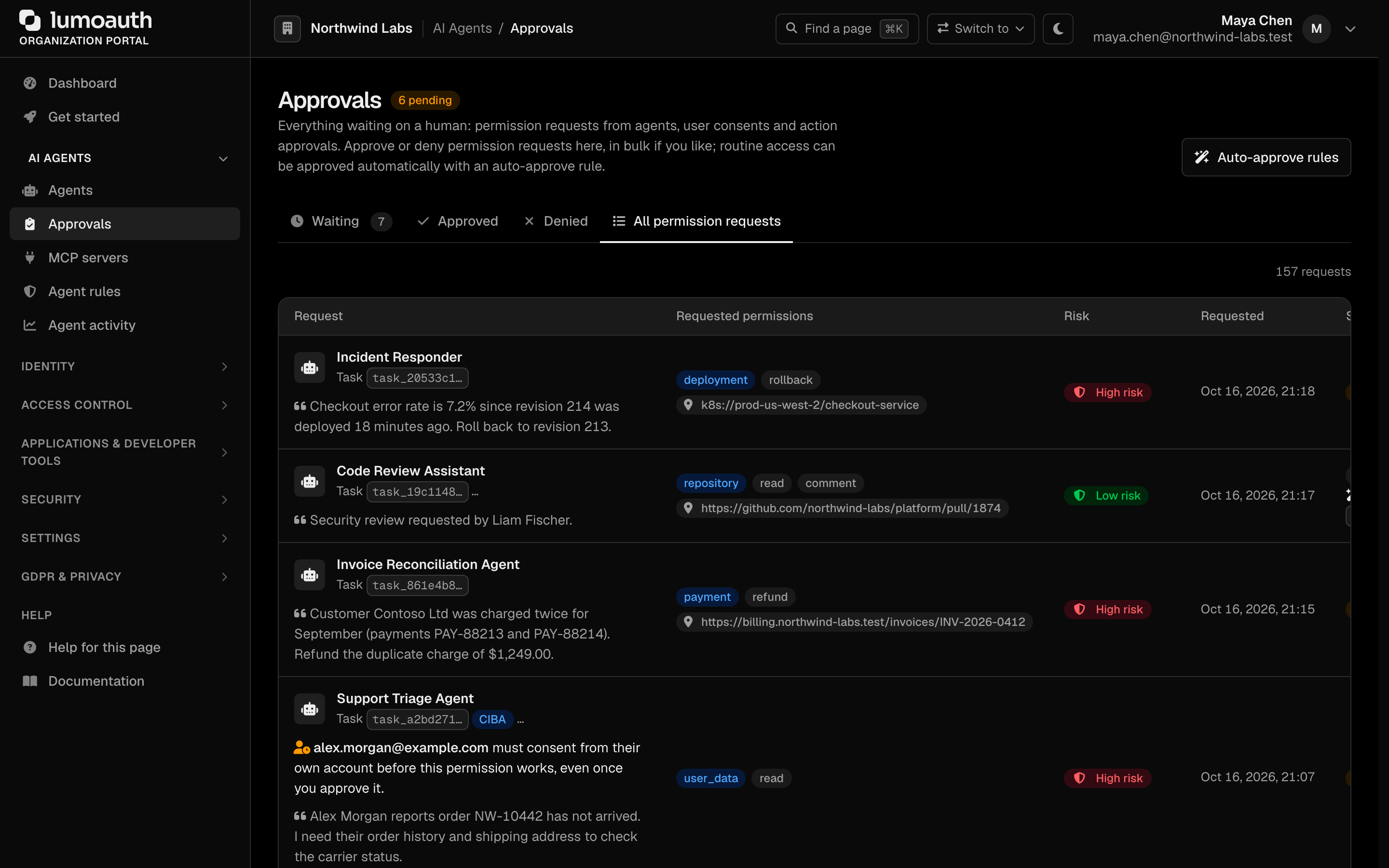
Each request is still validated and transitioned individually (atomic per-request state transitions), so a batch can partially succeed. The result summary shows how many were processed and how many were skipped (already handled, expired, not accessible to you, or refused by a review rule such as owner separation of duties). Portal decisions go through the same checks as the API.
The JIT-only /portal/jit-approvals view is also rolled up into the
unified approvals inbox at
/orgs/{orgId}/portal/approvals, which shows pending JIT, push, and AAuth
consent items together.
Batch approve / deny (mobile device API)
POST /orgs/{orgId}/push-auth/jit/respond-batch
Device-signed like the single /push-auth/jit/respond endpoint — one ECDSA
P-256 signature covers the whole batch. The device signs:
jit-approve-batch:{id1,id2,...}:{challenge_nonce}:{iat} (or jit-deny-batch:...)
Here the ids are the JIT request ids sorted lexicographically and
comma-joined. challenge_nonce is a single-use server nonce from
POST /push-auth/jit/challenge. iat is the current unix time (300 s
freshness window, same rules as the single respond endpoint). Body:
{
  "jit_request_ids": ["jit_abc...", "jit_def..."],
  "action": "approve",
  "account_id": "42",
  "challenge_nonce": "9f1c…",
  "signature": "base64url(R||S)",
  "iat": 1767222900,
  "notes": "Batch-approved during standup"
}
Response reports per-id results with partial success:
{
  "action": "approve",
  "results": {
    "jit_abc...": { "status": "approved" },
    "jit_def...": { "status": "error", "error": "not_pending" }
  },
  "succeeded": 1,
  "failed": 1
}
At most 25 ids per batch. The signer's bound user must hold jit.approve.
The full mobile surface is specified in the versioned
mobile approvals device API contract: jit/list,
jit/details, jit/respond, jit/respond-batch, the push payload schema, and
the exact challenge-signature formats.
Real-time inbox (SSE)
GET /orgs/{orgId}/portal/jit-approvals/stream
Server-Sent Events stream backing the live approvals inbox
(session-authenticated, same permission checks as the inbox page). Emits an
approvals event whenever the pending set changes:
event: approvals
data: {"pending_count": 3, "pending_ids": ["jit_a...", "jit_b...", "jit_c..."], "ts": 1767222900}
Heartbeat comments are sent every ~15 s and the server closes the stream
after ~55 s. EventSource clients reconnect automatically (re-running
authentication on each reconnect). The portal page uses this for live badge
updates and a "list changed — refresh" notice. Browsers without
EventSource silently fall back to manual refresh.
Approval policies
To reduce approval fatigue, a portal admin can create an approval policy
(called an auto-approve rule in the portal). It auto-approves a narrow
class of requests that would otherwise alert a human. Rules are managed under
AI Agents → Agent rules → Auto-approve rules
(/orgs/{orgId}/portal/agents/rules/auto-approve, also reachable from the
Auto-approve rules button on the Approvals page). Click Create rule, or
use Create auto-approve rule… in a pending request's row menu, which opens
the same dialog with the fields filled in from that request.
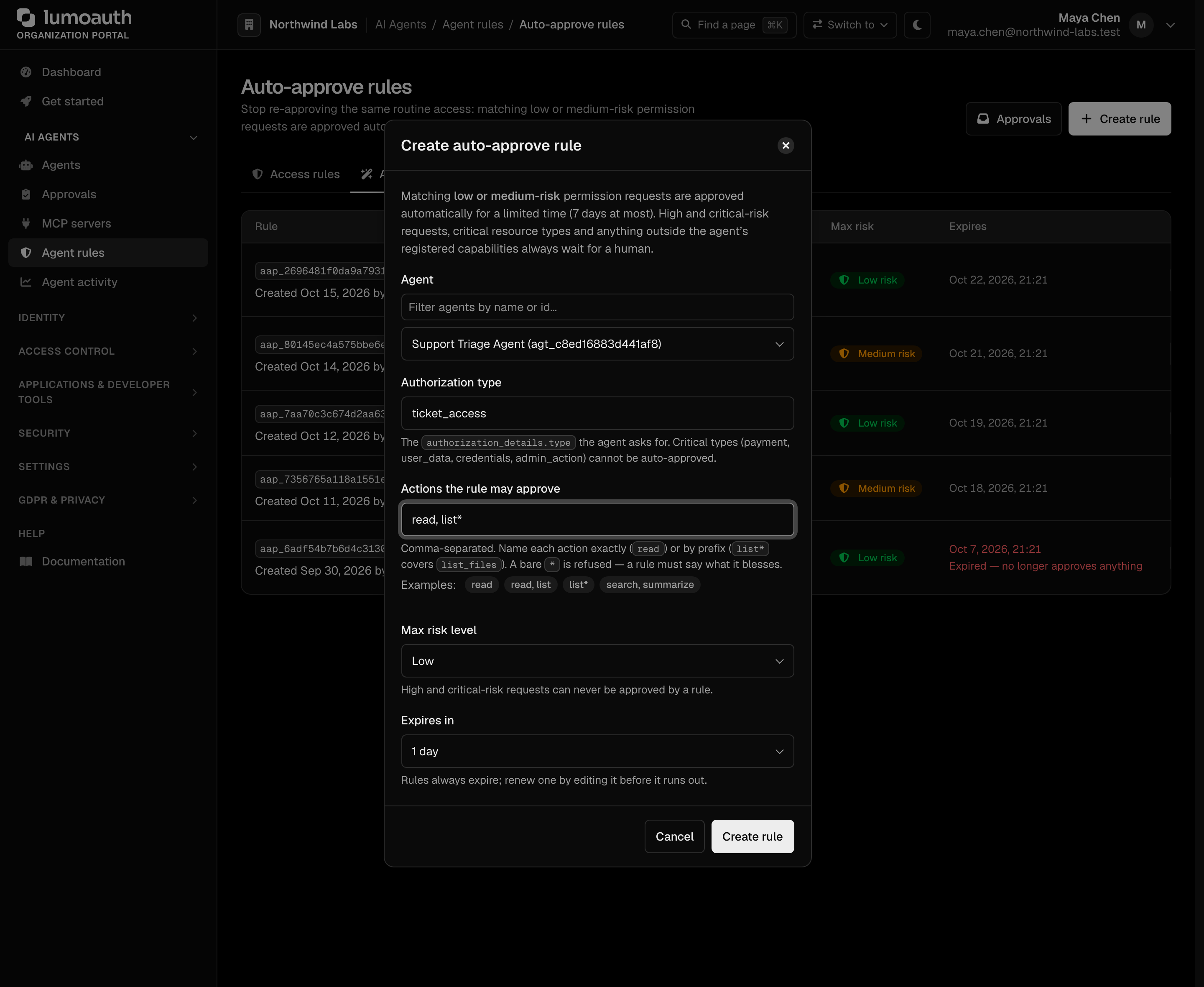
The Create auto-approve rule dialog asks for five things. Agent: choose one agent, or
Any agent in this organization, which needs an explicit confirmation that the
rule covers every agent, including agents registered later. Then the
Authorization type, Actions the rule may approve (comma-separated, exact
or prefix*), a Max risk level (Low or Medium) and Expires in (1, 3 or
7 days).
Policies are deliberately constrained:
- match on
authorization_details.type(case- and-/:-insensitive:File-Accessmatchesfile_access) + explicit action patterns (literal orprefix*wildcard), optionally scoped to a single agent. The bare*pattern is refused when creating a policy and ignored on policies that already have it. A standing approval must name what it approves; - never approve a request outside the agent's registered capabilities: the capability allowlist is the agent owner's promise, and only a human may widen it case by case;
- never approve a request whose delegation the agent merely asserted
(
delegation_consent_required: true) — see Create task; - risk ceiling is capped at medium, server-side — high and critical risk requests can NEVER be approved by a policy, no matter what the policy says;
- critical resource types (
payment,user_data,credentials,admin_action) can't have a policy at all: creating one is refused, and no policy ever matches them; - the owner of an agent cannot create a policy for that agent ("ask a different approver"). An organization-wide policy created by an agent's owner never approves that owner's agents (except in sandbox organizations);
- an expiry is required, at most 7 days out; expired or revoked policies stop matching immediately.
Policy auto-approvals are audited as jit.permission_policy_approved with
the policy id, and the request's reviewed_by is attributed to the policy
creator. Agent-initiated CIBA requests are never policy-approved — see
async authorization.
The JITContext exposes list_pending_requests() for the supervisory side
of these flows.
Error signaling (agent self-correction)
When a resource server rejects a request due to insufficient permissions, it returns 403 Forbidden with the Insufficient-Authorization-Details header naming the exact permission required:
HTTP/1.1 403 Forbidden
WWW-Authenticate: Bearer error="insufficient_authorization_details"
Insufficient-Authorization-Details: eyJ0eXBlIjoiZmlsZV9hY2Nlc3MiLC...

{
  "error": "insufficient_authorization_details",
  "error_description": "Token lacks required permission",
  "authorization_details_hint": {
    "type": "file_access",
    "actions": ["write"],
    "identifier": "report_2024.pdf"
  }
}
The agent can automatically parse this response and request the specific permission:
import base64
import json
import requests

def call_api_with_jit(agent_token, task_id, api_url, method="GET"):
    """Call API with automatic JIT permission escalation."""

    response = requests.request(method, api_url, headers={
        "Authorization": f"Bearer {agent_token}"
    })

    if response.status_code == 403:
        # Check for insufficient_authorization_details header
        header = response.headers.get("Insufficient-Authorization-Details")
        if header:
            # Decode the required authorization_details
            required_authz = json.loads(base64.b64decode(header))

            # Request JIT permission
            jit_response = requests.post(
                "https://app.lumoauth.dev/orgs/acme-corp/api/v1/jit/request",
                headers={"Authorization": f"Bearer {agent_token}"},
                json={
                    "task_id": task_id,
                    "authorization_details": required_authz,
                    "justification": "Required for user request"
                }
            )

            if jit_response.json()["status"] == "approved":
                # Get the JIT token
                token_url = jit_response.json()["token_url"]
                token_response = requests.post(
                    f"https://app.lumoauth.dev{token_url}",
                    headers={"Authorization": f"Bearer {agent_token}"}
                )
                jit_token = token_response.json()["access_token"]

                # Retry with JIT token
                return requests.request(method, api_url, headers={
                    "Authorization": f"Bearer {jit_token}"
                })

    return response
Best practices
| Practice | Description | Implementation |
|---|---|---|
| Ephemeral personas | Create a new sub-identity for every task or thread | Use task_id claim in JWT; call /jit/task at workflow start |
| Token downscoping | Start with zero permissions; add only what's needed per tool-call | Request specific authorization_details per operation |
| Human-in-the-loop | For high-risk JIT requests (delete, payment), pause token issuance | Configure webhook for approval notifications |
| Short TTLs | JIT tokens should rarely last longer than 5–15 minutes | Set requested_ttl on the request (default 600s, max 900s). In the Python SDK this is the ttl argument to request_permission() (default 300s, also capped at 900s). |
| Continuous validation | Don't just check at issuance — check during use | CAEP evaluates risk continuously and revokes suspicious tokens |
| Self-correction | Agents should request missing permissions automatically | Parse Insufficient-Authorization-Details header on 403 |
Risk levels and HITL
JIT requests are assessed for risk based on several factors:
| Risk level | Triggers | Behavior |
|---|---|---|
| Low | Read-only operations, non-sensitive resources | Auto-approved instantly |
| Medium | Write operations, elevated risk score for the task | Auto-approved with audit logging |
| High | Delete, admin, execute actions; sensitive resource types | Requires human approval (HITL) |
| Critical | Critical types (payment, user_data, credentials, admin_action); CAEP flags; multiple denials | Always requires human approval; never auto- or policy-approved |
Requests that are routed to HITL but score low/medium (e.g. forced through
review by a server-side permission-slug pattern) can be auto-approved by a
matching approval policy. High/critical never can, nor
can requests outside the agent's capabilities or with an asserted delegation
that the user has not consented to. Critical types are matched on their canonical form
(Payment, user-data, admin:action count), while the stored and echoed
type keeps the agent's spelling.
Audit events for delegation and token issuance
| Event | When |
|---|---|
jit.delegation_consented | the on-behalf-of user approved an asserted delegation |
jit.delegation_consent_refused | the on-behalf-of user denied it |
jit.delegation_approved_by_reviewer | a jit.approve holder overrode the missing consent |
jit.token_issuance_refused | an approved request could not be redeemed (window lapsed, task ended, agent/organization inactive, delegate blocked) |
jit.requests_retired | task completion / CAEP suspension retired requests that were never redeemed |
jit.budget_exceeded | a request or token issuance was refused by the agent's budget policy |
CAEP continuous validation
LumoAuth continuously evaluates agent behavior during task execution:
- Risk Score Accumulation: Each permission request adds to the task's risk score
- Denial Tracking: Multiple denials trigger automatic task suspension
- Anomaly Detection: High-frequency requests or unusual patterns trigger flags
- Real-time Revocation: Suspicious tasks have all JIT tokens revoked immediately
{
  "task_id": "task_a1b2c3d4e5f6g7h8",
  "active": false,
  "events": [
    {
      "type": "risk_threshold_exceeded",
      "details": {
        "risk_score": 65.0,
        "denial_count": 3
      },
      "timestamp": "2026-01-30T14:25:00Z"
    }
  ],
  "action": "suspended"
}
Complete integration example
This example covers the full JIT workflow using the lumoauth Python SDK:
- Agent authentication using client credentials
- User consent via OAuth delegation (on-behalf-of flow)
- Ephemeral task creation for isolated personas
- JIT permission requests with HITL support
- Token exchange for scoped, short-lived access
Install
pip install lumoauth
Set the required environment variables:
export LUMOAUTH_URL=https://app.lumoauth.dev
export LUMOAUTH_ORG_ID=acme-corp
export AGENT_CLIENT_ID=agt_...
export AGENT_CLIENT_SECRET=secret_...
Full Example
from lumoauth import LumoAuthAgent, JITContext

# 1. Authenticate the agent (client credentials)
agent = LumoAuthAgent()
agent.authenticate()

# 2. Create a JIT context (context-manager revokes tokens on exit)
with JITContext(agent) as jit:
    # 3. (Optional) Delegate on behalf of a user
    #    user_token is obtained when the user logs in via OAuth
    #    jit.delegate_on_behalf_of(user_token)

    # 4. Create an ephemeral task
    jit.create_task(
        name="Analyse Q4 Financial Report",
        task_type="analysis",
        on_behalf_of="alice@acme-corp.com",
    )

    # 5. Request a specific permission (RFC 9396)
    result = jit.request_permission(
        {
            "type": "file_access",
            "actions": ["read"],
            "identifier": "quarterly_report_q4_2024.pdf",
            "locations": ["https://storage.acme-corp.com/finance/"],
        },
        justification="User asked: 'What were our Q4 revenues?'",
    )

    if result["status"] == "approved":
        # 6. Exchange approval for a short-lived JIT token
        jit_token = jit.get_token(result["request_id"])

        # 7. Use the token to access the protected resource
        resp = jit.call(
            jit_token,
            "GET",
            "https://storage.acme-corp.com/finance/quarterly_report_q4_2024.pdf",
        )
        print(f"Read {len(resp.content)} bytes")

    elif result["status"] == "denied":
        # Reviewer notes stay private to the organization; only an opt-in
        # message written for the agent is relayed.
        print(f"Permission denied: {result.get('agent_message') or 'no message for the agent'}")
Auto-escalation
call_with_escalation handles the 403 → JIT request → retry loop when a resource returns an Insufficient-Authorization-Details header:
with JITContext(agent) as jit:
    jit.create_task(name="Ad-hoc data access")

    resp = jit.call_with_escalation(
        "GET",
        "https://api.acme-corp.com/v1/documents/doc_9982",
        justification="User asked for summary of doc_9982",
    )
    print(resp.json())
Success responses carry domain fields (task_id, request_id, status,
access_token, …) and an appropriate 2xx status. Errors are flat
{ "error": "<code>" } (e.g. invalid_token, request_not_found) with the
matching HTTP status code — there is no nested details object. Branch on the
HTTP status (or on the presence of error) to distinguish the two.
Framework examples
The same patterns work in any HTTP-capable language. Pick your framework:
| Framework | Guide |
|---|---|
| LangChain / LangGraph | View example → |
| CrewAI | View example → |
| OpenAI Agents SDK | View example → |
| Agno | View example → |
| Google ADK | View example → |
Common mistakes
403 insufficient_permissionswhen approving. The signed-in user lacksjit.approveor belongs to another organization. Grant the permission through a role (see Delegate approval); do not call the approve endpoint with an agent token; the reviewer must be a human user.400 invalid_requestsaying the owner cannot approve. You are reviewing a request from an agent that you created. Ask a second reviewer withjit.approve; there is no setting that relaxes this.401 invalid_tokenon/jit/approvefrom an automation. Approvals need a human: a browser session or a user access token withjit:approve. JIT, agent and delegated tokens are refused by design.- Request stays
pendingand nobody is notified. No user other than the owner holdsjit.approve, or the approval channel filters (minimum risk, agent ids) exclude the request. Check the approvals inbox at/orgs/{orgId}/portal/approvals. - A
payment(oruser_data,credentials,admin_action) request never auto-approves. By design: critical types always need a human, and approval policies for them can't be created. - "The owner of an agent cannot create an auto-approval policy". Ask another user with
jit.approveto create it; the owner's organization-wide policies also skip the owner's own agents. 401with anagk_key that used to work. The key was stored in plaintext by an old release; plaintext keys are no longer accepted. Rotate the agent's key; the new key is stored hashed.401on a JIT call after it worked in the browser. Agent credentials never create a session. Send theagk_key or agent token on every request, and only on agent, JIT and authz routes.- Approval arrived but the token endpoint rejects the exchange. The request expired between approval and exchange, or the agent was suspended (which revokes approved-but-unissued requests, see Kill switch). Create a new request.
Related
- Agent Registry — register the agent first
- Chain of Agency — on-behalf-of delegation using token exchange
- Mobile approvals device API — the device-signed approver endpoints, versioned
Standards used on this page
| Plain name | Standard |
|---|---|
| Rich authorization requests | RFC 9396 |
| Token exchange (delegation) | RFC 8693 |
| Shared Signals Framework (SSF) and Continuous Access Evaluation Profile (CAEP) | OpenID SSF 1.0 and OpenID CAEP 1.0 |
See the standards reference for what each one covers and how LumoAuth uses it.