Authentication
Every call to the Admin API (/orgs/{orgId}/api/v1/admin/**) must carry a credential. This
page tells you which one to use, what it can reach, and how to send it.
Which credential for which job
| You are building | Use | Send it as | It can reach |
|---|---|---|---|
| A server, cron job, CI pipeline or provisioning script | API key (lmk_…) | Authorization: ApiKey lmk_… or X-API-Key: lmk_… | The Admin API resources named by the key's scopes, plus dynamic client registration (admin:clients:register) and the endpoints for authorization decisions (authz:check) |
| An app that acts for a signed-in administrator | OAuth Bearer token | Authorization: Bearer eyJ… (or DPoP eyJ… for sender-constrained tokens) | The Admin API when the token carries an admin scope and the user holds the endpoint's permission; every other organization API according to its user scopes |
| The LumoAuth portal itself, or a first-party browser app on the same host | Session cookie | Set by the portal login; browser sends it automatically | The portal, account pages and the Admin API, authorised by the user's permissions (plus a CSRF witness header on writes) |
| A registered AI agent | Agent API key (agk_…) | Authorization: Bearer agk_… | Agent, JIT and authorization-check routes only. See Agent API keys |
Two rules apply to API keys and Bearer tokens alike:
- They never create a browser session. The response never sets a session cookie, and the credential must be presented on every call.
- They are refused on session-only pages. A Bearer token or API key sent to
/orgs/{orgId}/portal/**or/account/**gets403 forbidden(bearer_not_acceptedfor tokens,api_key_not_acceptedfor keys). Those pages authorise on the live browser session and its MFA state; no token can replace that.
The bearer token standard (OAuth 2.0 bearer token usage) defines how an access token travels in the
Authorization: Bearer header. It also defines how a resource server answers when the token is missing or invalid
(401 with a WWW-Authenticate: Bearer challenge, 403 for insufficient scope). To comply,
send the token only in that header over HTTPS, never in a query string, and read the
WWW-Authenticate header on 401 to learn why the token was rejected.
Read the standard.
Do this: three copy-paste examples
1. API key (server to server)
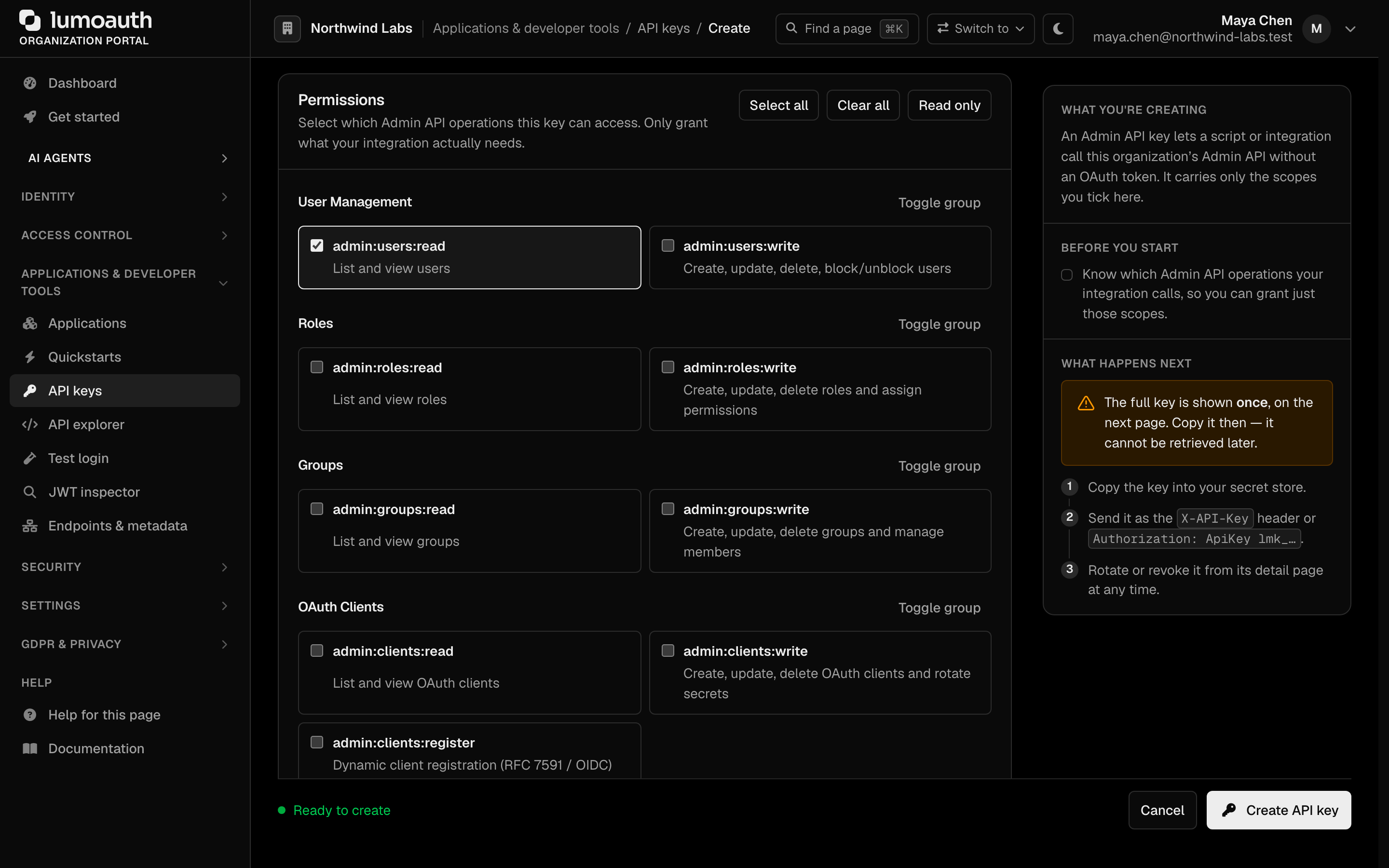
Create a key under Applications & developer tools → API keys in the portal
(/orgs/{orgId}/portal/settings/api-keys), tick the scopes that it needs (here
admin:users:read), and copy the value once.
- curl
- Node
- Python
- Go
curl https://app.lumoauth.dev/orgs/acme-corp/api/v1/admin/users \
  -H "Authorization: ApiKey lmk_abc123xyz..."
const resp = await fetch("https://app.lumoauth.dev/orgs/acme-corp/api/v1/admin/users", {
  headers: { "Authorization": `ApiKey ${process.env.LUMO_API_KEY}` }
});
console.log(await resp.json());
import os, requests

resp = requests.get(
    "https://app.lumoauth.dev/orgs/acme-corp/api/v1/admin/users",
    headers={"Authorization": f"ApiKey {os.environ['LUMO_API_KEY']}"}
)
print(resp.json())
import (
    "fmt"
    "io"
    "net/http"
    "os"
)

req, _ := http.NewRequest("GET", "https://app.lumoauth.dev/orgs/acme-corp/api/v1/admin/users", nil)
req.Header.Set("Authorization", "ApiKey "+os.Getenv("LUMO_API_KEY"))
resp, err := http.DefaultClient.Do(req)
if err != nil { panic(err) }
defer resp.Body.Close()
out, _ := io.ReadAll(resp.Body)
fmt.Println(string(out))
X-API-Key: lmk_… is accepted as an alternative header. Do not send an lmk_ key as
Authorization: Bearer; that header is reserved for OAuth tokens and the key will be rejected
with 401.
2. OAuth Bearer token (app acting for an administrator)
- In the portal, open the OAuth client that your app uses and add the admin scope that it needs to the
client's allowed scopes (for example
admin:users:read, or the blanketadmin). - Request that scope in the authorization request:
scope=openid profile admin:users:read. - Call the Admin API with the resulting access token. The signed-in user must hold the
permission that the endpoint requires (here
users.view; see Required permissions).
curl https://app.lumoauth.dev/orgs/acme-corp/api/v1/admin/users \
  -H "Authorization: Bearer eyJhbGciOiJSUzI1NiIsInR5cCI6ImF0K2p3dCJ9..."
See OAuth 2.0 Token Endpoint for how to obtain tokens and Scopes for the admin scope family.
The JWT access token profile says an access token issued as a JWT
must carry the JOSE header typ: at+jwt. This ensures that ID tokens, logout tokens and other JWTs
signed by the same key can never be mistaken for access tokens. LumoAuth mints access tokens
with typ: at+jwt and its resource servers (the Admin API and SCIM) reject any other typ.
If you validate LumoAuth access tokens yourself, check typ before the signature.
Read the standard.
3. Session cookie (first-party browser app on the same host)
A page served from the LumoAuth host (the portal, or your own first-party UI on the same origin) already has the session cookie. Read requests need nothing extra. Writes must add a CSRF witness header and come from the same origin:
const resp = await fetch("/orgs/acme-corp/api/v1/admin/users", {
  method: "POST",
  credentials: "same-origin",
  headers: {
    "Content-Type": "application/json",
    "X-Requested-With": "XMLHttpRequest"
  },
  body: JSON.stringify({ email: "jane@acme.com", name: "Jane Smith" })
});
See CSRF protection for session-authenticated requests.
How authorization works
API keys
An API key is an organization-bound credential whose reach is exactly its granted scopes. Every Admin API action declares the scope that it requires, and the check runs before the action, per resource, and fails closed:
- The key must belong to the organization in the URL, otherwise
401. - Read requests (
GET,HEAD,OPTIONS) needadmin:<resource>:readfor that resource. Scopes are matched exactly: a:writescope does not stand in for:read, so a job that both lists and changes users needsadmin:users:readandadmin:users:write. - Write requests (
POST,PUT,PATCH,DELETE) needadmin:<resource>:write. A read scope never authorises a write. - A scope for one resource never unlocks another:
admin:webhooks:readgets403on/admin/users. admin:clients:registeris a registration-only grant. It unlocksPOST /orgs/{orgId}/api/v1/connect/registerand nothing else on the Admin API.- The person who created the key must still be active (not blocked, deactivated or deleted)
and must still hold the permission that the endpoint requires. If they
lose it, every key that they created gets
403on that endpoint.
There is no blanket admin scope for API keys. Grant the resource scopes that you need from the scope catalogue.
Admin API scopes for Bearer tokens
An access token is accepted on the Admin API only when both hold:
- the token's subject holds the endpoint's permission in the organization, and
- the token carries an admin scope: either the blanket
adminscope, or a resource scopeadmin:<resource>:<read|write>from the same catalogue as API keys. The read/write class rule above applies (a write needs a:writescope), and per-resource isolation applies too.
The blanket admin scope satisfies every resource check but never exceeds the user's own
permissions. Tokens issued for ordinary applications (openid profile email) get
403 forbidden on the Admin API even when the user is an administrator. Dynamically
registered clients cannot obtain privileged scopes such as admin; add them to a
client created in the portal.
Tokens must be OAuth access tokens: JWTs with typ: at+jwt, or opaque tokens from the token
endpoint. ID tokens, logout tokens, and JIT or agent tokens are refused on the Admin API.
Session cookies
A portal session authorises through the user's permissions and roles, not through scopes. Bearer and API-key scope checks do not apply. Writes require the CSRF witness described below.
Required permissions
Scopes say what a credential may reach. Permissions say what the person behind it may do. Every Admin API action declares the permission that it needs, and the check runs before the action for every caller:
| Caller | Who must hold the permission |
|---|---|
| Browser session | The signed-in user |
| OAuth Bearer token | The token's user (the token also needs the scope, see above) |
API key (lmk_) | The key's creator, re-checked on every request, on top of the key's own scope |
Permissions are any-of: where a row lists two, either one is enough. An action that declares no permission is refused for
everyone (the check fails closed). A failure returns 403 forbidden and names what was
missing:
{
  "error": "forbidden",
  "message": "Access denied: missing required permission",
  "status": 403,
  "details": {
    "required_permissions": ["users.delete"]
  }
}
For an API key the message is Access denied: the API key owner does not hold the required permission. A key can therefore never do more than the administrator who created it can do
today: demote that person and their keys lose the same reach.
settings.manage is not "full admin"settings.manage governs authentication and security policy (sign-in, MFA and session
policy, PATCH /admin/tenant and /admin/organization, audit-log retention, sandboxes). In the
portal it also governs API keys, custom domains, directory (LDAP) and HR connections, log shippers and
the other integrations. It does not unlock users, roles, clients, webhooks or any other
resource: those need their own permission from the tables below. Grant the resource
permissions that a job needs; see Roles & Permissions.
Account-takeover containment
Some user actions hand the caller control of another account: setting a password, changing
the e-mail, activating or deactivating, removing an authenticator, issuing a temporary access code,
blocking, deactivating and deleting. They succeed only when the caller already holds
every permission that the target user holds in the organization. Otherwise the answer is 403 forbidden with
You cannot perform this action on an account that holds privileges you do not have.
(or, for authenticators, You cannot change the sign-in methods of an account that holds privileges you do not have.). For API keys the key's creator is the caller. A password
set by an administrator, including the initial password on POST /admin/users, must also
satisfy the organization's password policy and breached-password check (400 otherwise).
Permission per endpoint
Paths are relative to /orgs/{orgId}/api/v1.
Users
| Method | Endpoint | Permission | API-key / token scope |
|---|---|---|---|
| GET | /admin/users | users.view | admin:users:read |
| GET | /admin/users/{userId} | users.view | admin:users:read |
| POST | /admin/users | users.create | admin:users:write |
| PUT PATCH | /admin/users/{userId} | users.edit | admin:users:write |
| DELETE | /admin/users/{userId} | users.delete | admin:users:write |
| POST | /admin/users/{userId}/block | users.edit | admin:users:write |
| POST | /admin/users/{userId}/unblock | users.edit | admin:users:write |
| POST | /admin/users/{userId}/mfa/reset | users.edit | admin:users:write |
| GET | /admin/users/{userId}/roles | users.view | admin:users:read |
| PUT | /admin/users/{userId}/roles | users.edit | admin:users:write |
| POST | /admin/users/{userId}/roles | users.edit | admin:users:write |
| DELETE | /admin/users/{userId}/roles/{roleId} | users.edit | admin:users:write |
| GET | /admin/users/{userId}/groups | users.view | admin:users:read |
| PUT | /admin/users/{userId}/groups | users.edit | admin:users:write |
| POST | /admin/users/{userId}/groups | users.edit | admin:users:write |
| DELETE | /admin/users/{userId}/groups/{groupId} | users.edit | admin:users:write |
| GET | /admin/users/{userId}/permissions | users.view | admin:users:read |
| POST | /admin/users/{userId}/permissions | users.edit | admin:users:write |
| DELETE | /admin/users/{userId}/permissions/{permissionId} | users.edit | admin:users:write |
| POST | /admin/users/{userId}/verify-email | users.edit | admin:users:write |
| POST | /admin/users/{userId}/mark-verified | users.edit | admin:users:write |
| POST | /admin/users/{userId}/password-reset | users.edit | admin:users:write |
| PUT POST | /admin/users/{userId}/password | users.edit | admin:users:write |
MFA (admin)
| Method | Endpoint | Permission | API-key / token scope |
|---|---|---|---|
| GET | /admin/users/{userId}/authenticators | users.view | admin:users:read |
| DELETE | /admin/users/{userId}/authenticators/{authenticatorId} | users.edit | admin:users:write |
| POST | /admin/users/{userId}/temporary-access-code | users.edit | admin:users:write |
| GET | /admin/policies/mfa | settings.view | admin:settings:read |
| PUT | /admin/policies/mfa | settings.manage | admin:settings:write |
| GET | /admin/reports/mfa-coverage | users.view | admin:users:read |
Sessions and tokens
| Method | Endpoint | Permission | API-key / token scope |
|---|---|---|---|
| GET | /admin/sessions | users.view | admin:sessions:read |
| GET | /admin/users/{userId}/sessions | users.view | admin:sessions:read |
| DELETE | /admin/sessions/{sessionId} | users.edit | admin:sessions:write |
| DELETE | /admin/users/{userId}/sessions | users.edit | admin:sessions:write |
| GET | /admin/tokens | users.view | admin:sessions:read |
| DELETE | /admin/tokens/{tokenId} | users.edit | admin:sessions:write |
| DELETE | /admin/users/{userId}/tokens | users.edit | admin:sessions:write |
| POST | /admin/users/{userId}/sessions/revoke | users.edit | admin:sessions:write |
| POST | /admin/sessions/revoke-all | users.edit | admin:sessions:write |
| POST | /admin/users/{userId}/tokens/revoke | users.edit | admin:sessions:write |
| POST | /admin/clients/{clientId}/tokens/revoke | clients.edit | admin:sessions:write |
| DELETE | /admin/clients/{clientId}/tokens | clients.edit | admin:sessions:write |
| GET | /admin/sessions/stats | users.view | admin:sessions:read |
| GET | /admin/sessions/count | users.view | admin:sessions:read |
Roles
| Method | Endpoint | Permission | API-key / token scope |
|---|---|---|---|
| GET | /admin/roles | roles.view | admin:roles:read |
| GET | /admin/roles/{roleId} | roles.view | admin:roles:read |
| POST | /admin/roles | roles.create | admin:roles:write |
| PUT PATCH | /admin/roles/{roleId} | roles.edit | admin:roles:write |
| DELETE | /admin/roles/{roleId} | roles.delete | admin:roles:write |
| GET | /admin/roles/{roleId}/permissions | roles.view | admin:roles:read |
| PUT | /admin/roles/{roleId}/permissions | roles.assign-permissions | admin:roles:write |
| POST | /admin/roles/{roleId}/permissions | roles.assign-permissions | admin:roles:write |
| DELETE | /admin/roles/{roleId}/permissions/{permissionId} | roles.assign-permissions | admin:roles:write |
| GET | /admin/roles/{roleId}/users | roles.view | admin:roles:read |
| POST | /admin/roles/{roleId}/users | roles.edit | admin:roles:write |
| DELETE | /admin/roles/{roleId}/users/{userId} | roles.edit | admin:roles:write |
Groups
| Method | Endpoint | Permission | API-key / token scope |
|---|---|---|---|
| GET | /admin/groups | groups.view | admin:groups:read |
| GET | /admin/groups/{groupId} | groups.view | admin:groups:read |
| POST | /admin/groups | groups.create | admin:groups:write |
| PUT PATCH | /admin/groups/{groupId} | groups.edit | admin:groups:write |
| DELETE | /admin/groups/{groupId} | groups.delete | admin:groups:write |
| GET | /admin/groups/{groupId}/members | groups.view | admin:groups:read |
| POST | /admin/groups/{groupId}/members | groups.edit | admin:groups:write |
| DELETE | /admin/groups/{groupId}/members/{userId} | groups.edit | admin:groups:write |
| GET | /admin/groups/{groupId}/roles | groups.view | admin:groups:read |
| POST | /admin/groups/{groupId}/roles | groups.edit | admin:groups:write |
| DELETE | /admin/groups/{groupId}/roles/{roleId} | groups.edit | admin:groups:write |
| PUT | /admin/groups/{groupId}/roles | groups.edit | admin:groups:write |
Permissions and OAuth scopes
| Method | Endpoint | Permission | API-key / token scope |
|---|---|---|---|
| GET | /admin/permissions | roles.view | admin:permissions:read |
| GET | /admin/permissions/{permissionId} | roles.view | admin:permissions:read |
| POST | /admin/permissions | roles.assign-permissions | admin:permissions:write |
| PATCH | /admin/permissions/{permissionId} | roles.assign-permissions | admin:permissions:write |
| DELETE | /admin/permissions/{permissionId} | roles.assign-permissions | admin:permissions:write |
| GET | /admin/permissions/{permissionId}/usage | roles.view | admin:permissions:read |
| GET | /admin/scopes | roles.view | admin:permissions:read |
| POST | /admin/scopes | roles.assign-permissions | admin:permissions:write |
| DELETE | /admin/scopes/{scopeId} | roles.assign-permissions | admin:permissions:write |
OAuth clients
| Method | Endpoint | Permission | API-key / token scope |
|---|---|---|---|
| GET | /admin/clients | clients.view | admin:clients:read |
| GET | /admin/clients/{clientId} | clients.view | admin:clients:read |
| POST | /admin/clients | clients.create | admin:clients:write |
| PUT PATCH | /admin/clients/{clientId} | clients.edit | admin:clients:write |
| DELETE | /admin/clients/{clientId} | clients.delete | admin:clients:write |
| POST | /admin/clients/{clientId}/enable | clients.edit | admin:clients:write |
| POST | /admin/clients/{clientId}/disable | clients.edit | admin:clients:write |
| GET | /admin/clients/{clientId}/scopes | clients.view | admin:clients:read |
| PUT | /admin/clients/{clientId}/scopes | clients.edit | admin:clients:write |
| POST | /admin/clients/{clientId}/rotate-secret | clients.rotate-secret | admin:clients:write |
Customer organizations
| Method | Endpoint | Permission | API-key / token scope |
|---|---|---|---|
| GET | /admin/organizations | organizations.view | admin:users:read |
| POST | /admin/organizations | organizations.create | admin:users:write |
| GET | /admin/organizations/{organizationId} | organizations.view | admin:users:read |
| PUT PATCH | /admin/organizations/{organizationId} | organizations.edit | admin:users:write |
| DELETE | /admin/organizations/{organizationId} | organizations.delete | admin:users:write |
| GET | /admin/organizations/{organizationId}/members | organizations.view | admin:users:read |
| POST | /admin/organizations/{organizationId}/members | organizations.members.manage | admin:users:write |
| PUT PATCH | /admin/organizations/{organizationId}/members/{userId} | organizations.members.manage | admin:users:write |
| DELETE | /admin/organizations/{organizationId}/members/{userId} | organizations.members.manage | admin:users:write |
| GET | /admin/organizations/{organizationId}/roles | organizations.view | admin:roles:read |
| POST | /admin/organizations/{organizationId}/roles | organizations.edit | admin:roles:write |
| PUT PATCH | /admin/organizations/{organizationId}/roles/{roleId} | organizations.edit | admin:roles:write |
| DELETE | /admin/organizations/{organizationId}/roles/{roleId} | organizations.edit | admin:roles:write |
| GET | /admin/organizations/{organizationId}/invitations | organizations.view | admin:users:read |
| POST | /admin/organizations/{organizationId}/invitations | organizations.invitations.manage | admin:users:write |
| DELETE | /admin/organizations/{organizationId}/invitations/{invId} | organizations.invitations.manage | admin:users:write |
| POST | /admin/organizations/{organizationId}/invitations/{invId}/resend | organizations.invitations.manage | admin:users:write |
Social providers
| Method | Endpoint | Permission | API-key / token scope |
|---|---|---|---|
| GET | /admin/social-providers | idps.view | admin:social:read |
| GET | /admin/social-providers/available | idps.view | admin:social:read |
| GET | /admin/social-providers/types | idps.view | admin:social:read |
| GET | /admin/social-providers/callback-urls | idps.view | admin:social:read |
| GET | /admin/social-providers/{providerId} | idps.view | admin:social:read |
| POST | /admin/social-providers | idps.create | admin:social:write |
| PUT PATCH | /admin/social-providers/{providerId} | idps.edit | admin:social:write |
| DELETE | /admin/social-providers/{providerId} | idps.delete | admin:social:write |
| POST | /admin/social-providers/{providerId}/enable | idps.edit | admin:social:write |
| POST | /admin/social-providers/{providerId}/disable | idps.edit | admin:social:write |
Webhooks
| Method | Endpoint | Permission | API-key / token scope |
|---|---|---|---|
| GET | /admin/webhooks | webhooks.view | admin:webhooks:read |
| GET | /admin/webhooks/events | webhooks.view | admin:webhooks:read |
| GET | /admin/webhooks/{webhookId} | webhooks.view | admin:webhooks:read |
| POST | /admin/webhooks | webhooks.create | admin:webhooks:write |
| PUT PATCH | /admin/webhooks/{webhookId} | webhooks.edit | admin:webhooks:write |
| POST | /admin/webhooks/{webhookId}/enable | webhooks.edit | admin:webhooks:write |
| POST | /admin/webhooks/{webhookId}/disable | webhooks.edit | admin:webhooks:write |
| DELETE | /admin/webhooks/{webhookId} | webhooks.delete | admin:webhooks:write |
| POST | /admin/webhooks/{webhookId}/test | webhooks.edit | admin:webhooks:write |
| POST | /admin/webhooks/{webhookId}/rotate-secret | webhooks.edit | admin:webhooks:write |
| GET | /admin/webhooks/{webhookId}/deliveries | webhooks.view | admin:webhooks:read |
| GET | /admin/webhooks/{webhookId}/deliveries/{deliveryId} | webhooks.view | admin:webhooks:read |
| POST | /admin/webhooks/{webhookId}/deliveries/{deliveryId}/replay | webhooks.edit | admin:webhooks:write |
| POST | /admin/webhooks/tunnel/start | webhooks.edit | admin:webhooks:write |
| POST | /admin/webhooks/tunnel/{webhookId}/stop | webhooks.edit | admin:webhooks:write |
| GET | /admin/webhooks/tunnel/{webhookId}/stream | webhooks.view | admin:webhooks:read |
Shared Signals streams
| Method | Endpoint | Permission | API-key / token scope |
|---|---|---|---|
| POST | /ssf/stream | webhooks.create | admin:webhooks:write |
| GET | /ssf/stream | webhooks.view | admin:webhooks:read |
| DELETE | /ssf/stream | webhooks.delete | admin:webhooks:write |
| POST | /ssf/verify | webhooks.edit | admin:webhooks:write |
Audit logs
| Method | Endpoint | Permission | API-key / token scope |
|---|---|---|---|
| GET | /admin/audit-logs | audit.view | admin:audit:read |
| GET | /admin/audit-logs/{logId} | audit.view | admin:audit:read |
| GET | /admin/audit-logs/stats | audit.view | admin:audit:read |
| GET | /admin/audit-logs/actions | audit.view | admin:audit:read |
| GET | /admin/audit-logs/retention | audit.view | admin:audit:read |
| PUT PATCH | /admin/audit-logs/retention | settings.manage | admin:settings:write |
| GET | /admin/audit-logs/export | audit.export | admin:audit:read |
Settings, analytics and organization
| Method | Endpoint | Permission | API-key / token scope |
|---|---|---|---|
| GET | /admin/settings | settings.view | admin:settings:read |
| GET | /admin/settings/general | settings.view | admin:settings:read |
| PATCH PUT | /admin/settings/general | settings.edit | admin:settings:write |
| GET | /admin/settings/authentication | settings.view | admin:settings:read |
| PATCH PUT | /admin/settings/authentication | settings.manage | admin:settings:write |
| GET | /admin/settings/security | settings.view | admin:settings:read |
| PATCH PUT | /admin/settings/security | settings.manage | admin:settings:write |
| GET | /admin/settings/email | settings.view | admin:settings:read |
| PATCH PUT | /admin/settings/email | settings.edit | admin:settings:write |
| GET | /admin/tenant | settings.view | admin:settings:read |
| GET | /admin/organization | settings.view | admin:settings:read |
| PUT PATCH | /admin/tenant | settings.manage | admin:settings:write |
| PUT PATCH | /admin/organization | settings.manage | admin:settings:write |
| GET | /admin/settings/auth | settings.view | admin:settings:read |
| PUT PATCH | /admin/settings/auth | settings.manage | admin:settings:write |
| GET | /admin/settings/branding | branding.view | admin:settings:read |
| PUT PATCH | /admin/settings/branding | branding.edit | admin:settings:write |
| GET | /admin/settings/scim | scim.view | admin:settings:read |
| PUT PATCH | /admin/settings/scim | scim.edit | admin:settings:write |
| GET | /admin/analytics/dashboard | analytics.view | admin:analytics:read |
| GET | /admin/analytics/logins | analytics.view | admin:analytics:read |
| GET | /admin/analytics/users | analytics.view | admin:analytics:read |
Email templates
| Method | Endpoint | Permission | API-key / token scope |
|---|---|---|---|
| GET | /admin/email-templates | settings.view | admin:settings:read |
| GET | /admin/email-templates/{type} | settings.view | admin:settings:read |
| PUT | /admin/email-templates/{type} | settings.edit | admin:settings:write |
| DELETE | /admin/email-templates/{type} | settings.edit | admin:settings:write |
| POST | /admin/email-templates/{type}/preview | settings.edit | admin:settings:write |
| GET | /admin/email-templates/{type}/variables | settings.view | admin:settings:read |
Sandboxes
| Method | Endpoint | Permission | API-key / token scope |
|---|---|---|---|
| POST | /admin/sandbox/spawn | settings.manage | admin:settings:write |
| GET | /admin/sandbox | settings.view | admin:settings:read |
| POST | /admin/sandbox/{sandboxSlug}/destroy | settings.manage | admin:settings:write |
AI agents
| Method | Endpoint | Permission | API-key / token scope |
|---|---|---|---|
| GET | /admin/agents | agents.view | admin:agents:read |
| GET | /admin/agents/{agentId} | agents.view | admin:agents:read |
| POST | /admin/agents | agents.create | admin:agents:write |
| PUT PATCH | /admin/agents/{agentId} | agents.edit | admin:agents:write |
| POST | /admin/agents/{agentId}/rotate-key | agents.edit | admin:agents:write |
| POST | /admin/agents/{agentId}/enable | agents.edit | admin:agents:write |
| POST | /admin/agents/{agentId}/disable | agents.edit | admin:agents:write |
| DELETE | /admin/agents/{agentId} | agents.delete | admin:agents:write |
| POST | /admin/agents/{agentId}/revoke-key | agents.edit | admin:agents:write |
| GET | /admin/agents/{agentId}/scopes | agents.view | admin:agents:read |
| PUT | /admin/agents/{agentId}/scopes | agents.edit | admin:agents:write |
| POST | /admin/agents/{agentId}/rotate-credentials | agents.edit | admin:agents:write |
| POST | /admin/agents/{agentId}/activate | agents.edit | admin:agents:write |
| POST | /admin/agents/{agentId}/deactivate | agents.edit | admin:agents:write |
| POST | /admin/agents/{agentId}/token | agents.edit | admin:agents:write |
MCP servers
| Method | Endpoint | Permission | API-key / token scope |
|---|---|---|---|
| GET | /admin/mcp/servers | agents.view | admin:agents:read |
| POST | /admin/mcp/servers | agents.create | admin:agents:write |
| GET | /admin/mcp/servers/{serverId} | agents.view | admin:agents:read |
| DELETE | /admin/mcp/servers/{serverId} | agents.delete | admin:agents:write |
ABAC attributes
| Method | Endpoint | Permission | API-key / token scope |
|---|---|---|---|
| GET | /abac/attributes | abac.view | admin:abac:read |
| GET | /abac/attributes/{id} | abac.view | admin:abac:read |
| POST | /abac/attributes | abac.manage | admin:abac:write |
| PUT PATCH | /abac/attributes/{id} | abac.manage | admin:abac:write |
| DELETE | /abac/attributes/{id} | abac.manage | admin:abac:write |
ABAC policies
| Method | Endpoint | Permission | API-key / token scope |
|---|---|---|---|
| GET | /abac/policies | abac.view | admin:abac:read |
| GET | /abac/policies/{id} | abac.view | admin:abac:read |
| POST | /abac/policies | abac.manage | admin:abac:write |
| PUT PATCH | /abac/policies/{id} | abac.manage | admin:abac:write |
| DELETE | /abac/policies/{id} | abac.manage | admin:abac:write |
| POST | /abac/policies/{id}/toggle | abac.manage | admin:abac:write |
Scope catalogue
These are the scopes that you can grant to an API key. OAuth clients can additionally be allowed
the blanket admin scope.
| Scope | Unlocks |
|---|---|
admin:users:read | List and view users |
admin:users:write | Create, update, delete, block and unblock users |
admin:roles:read | List and view roles |
admin:roles:write | Create, update, delete roles and assign permissions |
admin:groups:read | List and view groups |
admin:groups:write | Create, update, delete groups and manage members |
admin:clients:read | List and view OAuth clients |
admin:clients:write | Create, update, delete OAuth clients and rotate secrets |
admin:clients:register | Dynamic client registration only |
admin:webhooks:read | List and view webhooks |
admin:webhooks:write | Create, update, delete webhooks and manage deliveries |
admin:audit:read | List, view and export audit logs |
admin:social:read | List and view social login providers |
admin:social:write | Create, update, delete social login providers |
admin:agents:read | List and view AI agents |
admin:agents:write | Create, update, delete agents and manage credentials |
admin:permissions:read | List and view permissions and OAuth scopes |
admin:permissions:write | Create, update, delete permissions and OAuth scopes |
admin:settings:read | Read organization and authentication settings |
admin:settings:write | Update organization, authentication, branding and AI settings |
admin:analytics:read | View dashboard and analytics data |
admin:sessions:read | List active sessions and tokens |
admin:sessions:write | Revoke sessions and tokens |
admin:abac:read | List and view ABAC attributes and policies |
admin:abac:write | Create, update, delete ABAC attributes and policies |
authz:check | Ask authorization decisions about subjects other than the key owner (check, AuthZEN, Zanzibar check and expand) |
Which scope guards which endpoint
Some endpoint families have no scope of their own and use the closest one.
| Endpoint family | Resource scope |
|---|---|
/admin/users/** (incl. roles, groups, permissions, passwords) | admin:users:* |
/admin/users/{userId}/sessions, /admin/users/{userId}/tokens | admin:sessions:* |
/admin/organizations/** (customer organizations, members, invitations) | admin:users:* |
/admin/organizations/{organizationId}/roles/** | admin:roles:* |
/admin/roles/** | admin:roles:* |
/admin/groups/** | admin:groups:* |
/admin/clients/** | admin:clients:* |
/admin/clients/{clientId}/tokens, /admin/clients/{clientId}/tokens/revoke | admin:sessions:write |
/admin/webhooks/** and /orgs/{orgId}/api/v1/ssf/** (Shared Signals streams) | admin:webhooks:* |
/admin/audit-logs/** | admin:audit:read (retention update: admin:settings:write) |
/admin/social-providers/** | admin:social:* |
/admin/agents/** and /admin/mcp/servers/** | admin:agents:* |
/admin/permissions/** and /admin/scopes/** | admin:permissions:* |
/admin/settings/**, /admin/organization, /admin/email-templates/**, /admin/sandbox/** | admin:settings:* |
/admin/analytics/** | admin:analytics:read |
/admin/sessions/**, /admin/tokens/** | admin:sessions:* |
/orgs/{orgId}/api/v1/abac/attributes/**, /orgs/{orgId}/api/v1/abac/policies/** | admin:abac:* |
/orgs/{orgId}/api/v1/connect/register | admin:clients:register |
/api/v1/authz/**, /orgs/{orgId}/api/v1/authz/**, /orgs/{orgId}/api/v1/zanzibar/** | authz:check |
API Keys
API keys are long-lived credentials bound to one organization. They start with lmk_
(example: lmk_s3cr3t_abc123) and are shown in full only once, at creation.
Generating API Keys
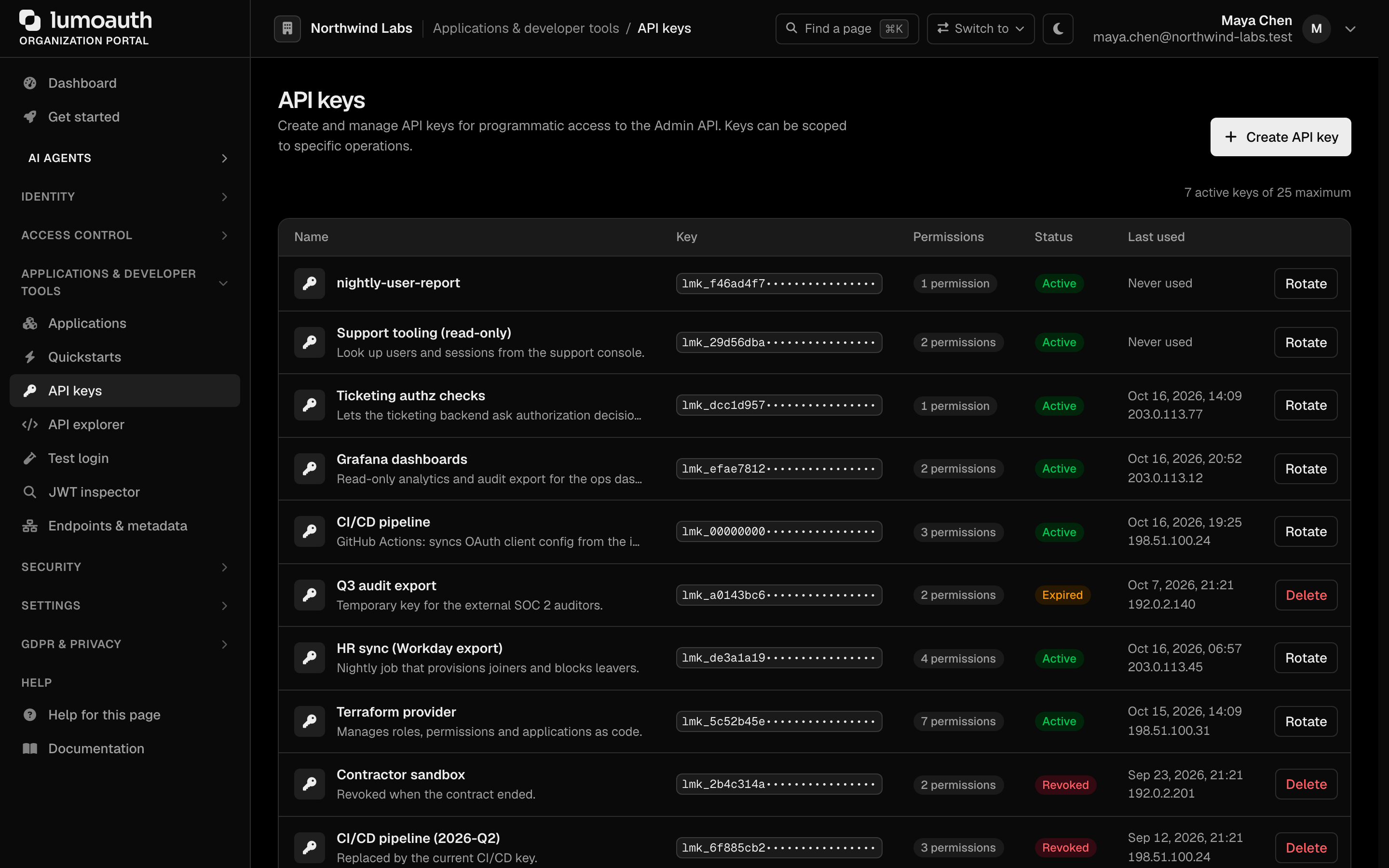
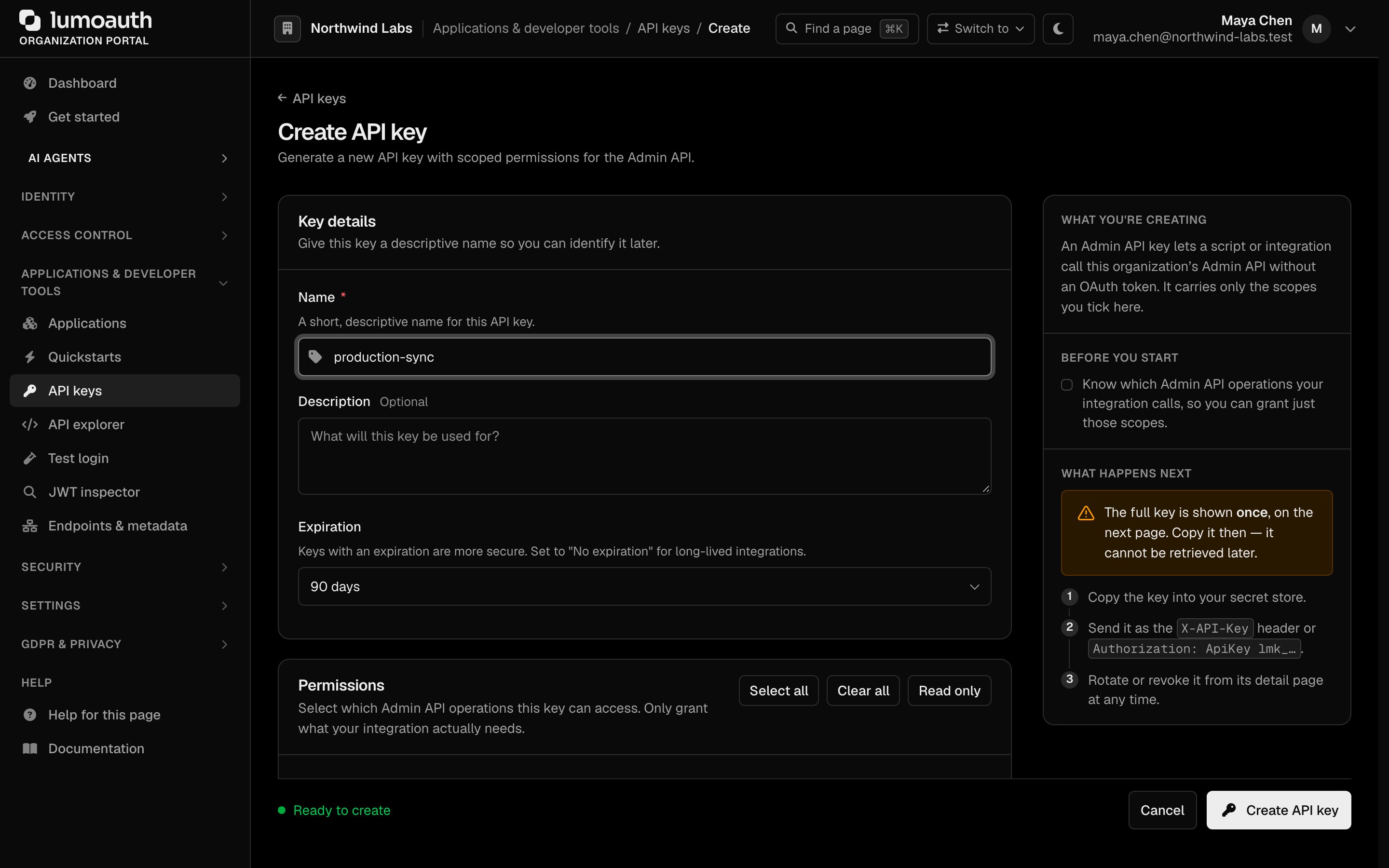
- Navigate to Applications & developer tools → API keys in your organization portal.
- Click Create API key.
- Give the key a descriptive name (for example
production-sync) and select the scopes that it needs. - Choose an Expiration (or No expiration).
- Click Create API key and copy the generated key. It is displayed only once.
Store API keys in a secret manager (AWS Secrets Manager, Vault, and so on). Never commit them to source control, and never include them in client-side code.
The user guide covers rotation, revocation and best practices: API keys.
Agent API Keys
An agent API key (agk_ prefix) is the first-class credential minted when an
agent is registered. It is distinct from the admin lmk_ API key.
lmk_ keys authorize human or service admin access to the Admin API, while an agk_ key
authenticates the agent itself as a ROLE_AGENT principal.
Present it as a Bearer token, the same Authorization header that agents use for their OAuth
access tokens:
curl https://app.lumoauth.dev/orgs/acme-corp/api/v1/agents/me \
  -H "Authorization: Bearer agk_abc123xyz..."
Unlike the admin key, an agk_ key is accepted only on agent-scoped routes and fails
closed everywhere else:
/orgs/{orgId}/api/v1/agents/*: agent identity, Ask API, per-tool MCP authorization/orgs/{orgId}/api/v1/jit/*: JIT permission tasks and token requests/api/v1/authz/check*: the (org-agnostic) endpoint for authorization decisions
The key resolves to the registered agent and is subject to the same conditional access policies as an agent's OAuth token. See the Agent Registry for how to obtain and rotate it.
Bearer Tokens
Bearer tokens are short-lived JWTs or opaque tokens issued by the OAuth 2.0 token endpoint. Use them when acting on behalf of a user, or for machine-to-machine flows via the Client Credentials grant.
curl https://app.lumoauth.dev/orgs/acme-corp/api/v1/oauth/userinfo \
  -H "Authorization: Bearer eyJhbGciOiJSUzI1NiIsInR5cCI6ImF0K2p3dCJ9..."
For the Admin API, the token must additionally carry an admin scope; see Admin API scopes for Bearer tokens.
Sender-constrained (DPoP) tokens
If the token was issued with DPoP, send it as Authorization: DPoP <token> together with a
fresh DPoP proof header signed by the same key. A DPoP-bound token presented as a plain
Bearer token, or with a proof from a different key, is rejected with 401.
Sender-constrained tokens (DPoP) bind an access token to a
client-held key so that a stolen token is useless without that key. To comply, generate a
key pair per client instance and send a DPoP proof JWT (typ: dpop+jwt, fresh jti, htm,
htu, iat, and ath when a token is presented) on every request. Honour
use_dpop_nonce challenges by retrying with the server-issued DPoP-Nonce. LumoAuth makes
nonces mandatory per organization through settings.security.dpop_require_nonce.
Read the standard and
DPoP in LumoAuth.
CSRF Protection for Session-Authenticated Requests
State-changing Admin API requests (POST, PUT, PATCH, DELETE) authenticated with a
session cookie must pass two checks:
- Include an
X-Requested-WithorX-CSRF-Tokenheader (any non-empty value). Browsers never attach custom headers to a cross-site form post, so their presence proves that a script on your origin made the call. - If the browser sends an
Originheader (or, failing that, aReferer), it must name the LumoAuth host serving the request. A foreign ornullorigin is refused. Requests that send neither header are accepted.
Either failure returns 403:
{
  "error": "forbidden",
  "message": "CSRF protection: state-changing admin requests must include an X-Requested-With or X-CSRF-Token header.",
  "status": 403
}
curl -X POST https://app.lumoauth.dev/orgs/acme-corp/api/v1/admin/users \
  -H "X-Requested-With: XMLHttpRequest" \
  -H "Origin: https://app.lumoauth.dev" \
  -H "Content-Type: application/json" \
  --cookie "session=..." \
  -d '{ "email": "jane@acme.com", "name": "Jane Smith" }'
API-key and Bearer-token callers are exempt. They are not cookie-bound, so classic CSRF does not apply and no extra header is required. The server-to-server examples throughout this reference need no CSRF header.
CORS and the Admin API
The origins registered on your OAuth clients (allowed_origins) are honoured for the public
OAuth, OIDC and user-facing APIs, never for the Admin API. A browser app on a different
origin cannot call /orgs/{orgId}/api/v1/admin/** with the user's session cookie. Only the
LumoAuth host itself and the platform's own origin allow-list are accepted
there. Call the Admin API from your backend with an API key instead.
Authentication Errors
| Status | error | Meaning |
|---|---|---|
401 | invalid_api_key | The API key is missing, malformed, expired, revoked, belongs to another organization, or its creator is no longer active. WWW-Authenticate: ApiKey realm="Admin API". |
401 | invalid_token | The Bearer token is missing, expired, has the wrong typ, fails signature or issuer checks, or is DPoP-bound and presented without a valid proof. WWW-Authenticate: Bearer …. |
401 | unauthorized | No credential at all on an endpoint that requires one. |
403 | forbidden | The credential is valid but not allowed here: missing scope, wrong scope class (read scope on a write), Bearer token without an admin scope, user or key creator without the endpoint's permission, a token or key on a session-only page, or a failed CSRF witness. details.required_scopes and details.granted_scopes are present for scope failures, details.required_permissions for permission failures. |
429 | rate_limited | The credential spent its per-credential budget (600 requests per 60 seconds by default). Wait for Retry-After seconds. See Rate limits. |
403 | access_policy_denied | An agent credential was blocked by a conditional access policy; reason carries the policy code. |
The full envelope is described in Errors.
Common mistakes
403 forbiddenon the Admin API with an OAuth token that works elsewhere. The token lacks an admin scope. Addadminoradmin:<resource>:<read|write>to the client's allowed scopes and request it.403on aPOSTwith a key that canGETthe same resource. The key holds only a:readscope. Writes need:write.403on/admin/userswith a key made for webhooks. Scopes are per resource. Grantadmin:users:readas well, or create a separate key.403and the key used to work. The person who created the key was deactivated, or no longer holds the permission indetails.required_permissions. Create a new key from an active administrator who holds it.403withdetails.required_permissionsalthough the user holdssettings.manage.settings.manageis not a blanket admin grant. Give the user (or the key's creator) the listed resource permission, for exampleusers.view.401 invalid_tokenwhen sendingAuthorization: Bearer lmk_…. API keys go inAuthorization: ApiKey …orX-API-Key.401 invalid_tokenwith a valid-looking JWT. It is an ID token, not an access token. Onlytyp: at+jwtJWTs (or opaque access tokens) are accepted.- Portal pages return
403 bearer_not_accepted. The portal and account pages are session-only. Sign in through the browser; use the Admin API for automation. 403"CSRF protection" from a browser app. AddX-Requested-With(orX-CSRF-Token) to the request and make sure it is served from the LumoAuth host. Cross-origin browser calls to the Admin API are not possible; move the call to your backend.- No cookie after authenticating with a key or token. That is by design. Credentials are stateless and must be sent on every request.
Standards used on this page
| Plain name | Standard |
|---|---|
| Bearer tokens | RFC 6750 |
| JWT access token profile | RFC 9068 |
| Dynamic client registration | RFC 7591 and RFC 7592 |
| Sender-constrained tokens (DPoP) | RFC 9449 |
See the standards reference for what each one covers and how LumoAuth uses it.