Organization Admin API
Programmatic access to organization administration: user management, roles and groups, OAuth clients, webhooks, audit logs, social providers, agents, permissions, settings, analytics, and sessions. Authentication uses an API key or an OAuth 2.0 access token obtained with the client credentials grant. That grant is a server-to-server sign-in: the application presents its own client ID and secret, with no user involved.
Every endpoint here checks two things. The credential's owner must hold the endpoint's own permission in the organization (for example users.view; see Required permissions). The credential must also carry a scope that covers the endpoint: admin:<resource>:<read|write> on an API key, or the same scope or the blanket admin on an access token. Missing either gives 403. Neither credential creates a browser session. See Credentials and access model.
Table of Contents
- Getting Started
- Authentication
- Base URL Structure
- Common Patterns
- Error Handling
- Rate Limiting
- API Reference
- Quick Examples
Getting Started
Prerequisites
- A LumoAuth organization (identified by a slug, e.g.,
acme-corp) - An admin user holding the permissions for the endpoints that you call (
settings.managealone is not enough) - Either an API key with the scopes that you need (the simplest path, see Creating an API Key) or an access token that carries an admin scope
Quick Start
# 1. Obtain an access token using client credentials.
#    The client must be a first-party client allowed the 'admin' scope (or a
#    narrower admin:<resource>:<read|write> scope); request it explicitly.
curl -X POST 'https://app.lumoauth.dev/orgs/acme-corp/api/v1/oauth/token' \
  -H 'Content-Type: application/x-www-form-urlencoded' \
  -d 'grant_type=client_credentials&client_id=YOUR_CLIENT_ID&client_secret=YOUR_CLIENT_SECRET&scope=admin'

# 2. Use the token to list users
curl 'https://app.lumoauth.dev/orgs/acme-corp/api/v1/admin/users' \
  -H 'Authorization: Bearer YOUR_ACCESS_TOKEN'
Authentication
Every Admin API endpoint accepts either of two credentials (see the OpenAPI
BearerAuth / ApiKeyAuth security schemes):
1. OAuth 2.0 access token — obtained via the client credentials grant (see the
Quick Start above). The token must carry admin or an admin:<resource>:<read|write>
scope; an openid profile email token is refused with 403 even for administrators.
Details: Admin API scopes for Bearer tokens.
Authorization: Bearer YOUR_ACCESS_TOKEN
2. Organization API key — sent in either of these equivalent forms (keys carry the
lmk_ prefix):
X-API-Key: lmk_your_api_key_here
Authorization: ApiKey lmk_your_api_key_here
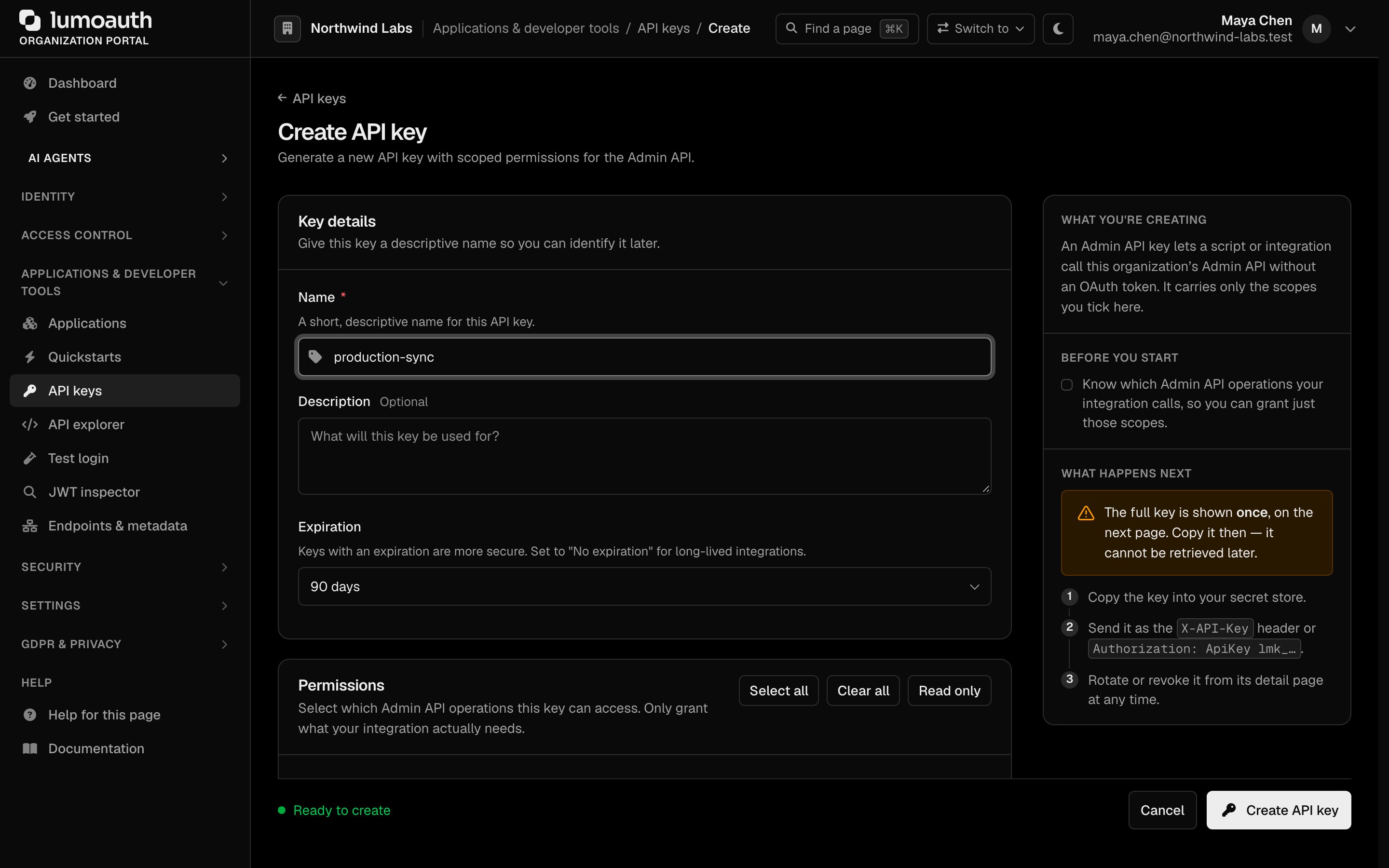
Creating an API Key
- Navigate to your organization portal at
/orgs/{orgId}/portal/settings/api-keys(API keys under Applications & developer tools in the sidebar) - Click "Create API key"
- Select only the scopes that your use case needs (
admin:users:readfor a read-only report; add the:writescope only when the job changes data). A read scope cannot change data, and a scope for a single resource cannot reach other resources. Full list: API key scopes - Click Create API key, then copy and securely store the generated API key (it is shown only once)
Store your client secrets and access tokens securely. Never commit them to source control or expose them in client-side code.
Required Permissions
To access the Admin API, the user behind the credential (the API key's creator, or the token's subject) must:
- Belong to the organization being accessed
- Be active and hold the permission that the endpoint declares. The full list is in Required permissions
This is re-checked on every request. If the key's creator is deactivated or loses a permission, the key stops working for the endpoints that need it. A 403 names the missing permission in details.required_permissions.
Credentials never create a session
Requests authenticated with an API key or a Bearer token are stateless: no session cookie is
set, and the credential must be sent on every call. Both are refused (403) on the portal
and account pages, which only accept an interactive browser login.
Common mistakes
| Response | Cause | Fix |
|---|---|---|
403 with an OAuth token from an ordinary app | Token has no admin scope | Request admin or admin:<resource>:<read|write> on a first-party client, or use an API key |
403 Insufficient scope with an API key; body lists required_scopes | Key lacks the resource or :write scope | Create a key with the listed scope |
403 Access denied: missing required permission with details.required_permissions | Credential owner lacks the endpoint's permission | Grant the listed permission, or create the key under an admin who holds it |
400 invalid_request with details.rejected_keys on PATCH /organization | settings contained a key outside the allow-list or a reserved *_secret/*_token/*_key suffix | Send only the writable settings keys |
Base URL Structure
All Admin API endpoints follow this pattern:
/orgs/{orgId}/api/v1/admin/{resource}
Where:
\{orgId\}is the unique identifier for your organization\{resource\}is the resource type (users, roles, clients, etc.)
Example Environments
| Environment | Base URL |
|---|---|
| Production | https://app.lumoauth.dev/orgs/\{orgId\}/api/v1/admin |
| EU Production | https://eu.app.lumoauth.dev/orgs/\{orgId\}/api/v1/admin |
Common Patterns
Pagination
All list endpoints support pagination:
| Parameter | Type | Default | Description |
|---|---|---|---|
page | integer | 1 | Page number (1-indexed) |
limit | integer | 25 | Items per page (max: 100) |
Response Format:
{
  "data": [...],
  "meta": {
    "total": 100,
    "page": 1,
    "limit": 25,
    "totalPages": 4,
    "hasNextPage": true,
    "hasPreviousPage": false
  }
}
Filtering
Many endpoints support filtering via query parameters:
# Filter users by role and active status
GET /admin/users?role=admin&active=true

# Search across fields
GET /admin/users?search=john
Sorting
List endpoints typically support sorting:
GET /admin/users?sortBy=createdAt&sortDir=DESC
ID Lookup
User endpoints accept the user's UUID or email address in the path:
- UUID:
/admin/users/01234567-89ab-cdef-0123-456789abcdef - Email:
/admin/users/john@example.com
Roles, groups and permissions accept their id or slug: /admin/roles/admin.
Error Handling
All errors follow a consistent format. error is a machine-readable string code
(not a boolean), message is a human-readable description, status echoes the HTTP
status, and details is an optional object with field-level context:
{
  "error": "validation_error",
  "message": "Human-readable error description",
  "status": 422,
  "details": {
    "missing_fields": ["email"],
    "invalid_values": {
      "status": "Must be one of: active, inactive, suspended"
    }
  }
}
Status Codes and Error Codes
Each HTTP status maps to a stable error code that your code can branch on.
See API Error Reference for the complete list.
| Code | Meaning | error code |
|---|---|---|
200 | Success | — |
201 | Created | — |
400 | Bad Request - Invalid input | invalid_request |
401 | Unauthorized - Missing or invalid credentials | unauthorized |
403 | Forbidden - Insufficient permissions | forbidden |
404 | Not Found - Resource doesn't exist | not_found |
409 | Conflict - Resource already exists | conflict |
422 | Unprocessable Entity - Validation failed | validation_error |
429 | Too Many Requests - Rate limited | rate_limit_exceeded |
500 | Internal Server Error | server_error |
503 | Service Unavailable | temporarily_unavailable |
Rate Limiting
The Admin API is rate limited per credential to prevent abuse. When rate limited, you receive a 429 Too Many Requests response with the error code rate_limit_exceeded and a Retry-After header giving the number of seconds to wait before retrying. There are no per-request quota headers on successful responses.
API Reference
Available Resources
| Resource | Endpoint | Description |
|---|---|---|
| Users | /admin/users | Create, update, search users. Reset passwords, view MFA enrollment, block/unblock accounts |
| Roles | /admin/roles | Define and manage roles. Assign permissions, view role members |
| Groups | /admin/groups | Organize users into groups. Assign roles, manage memberships |
| Permissions | /admin/permissions | Create custom permissions and scopes for fine-grained access control |
| OAuth Clients | /admin/clients | Register OAuth 2.0 clients, configure grants and redirects, rotate secrets |
| Webhooks | /admin/webhooks | Subscribe to events, test endpoints, manage webhook secrets |
| Social Providers | /admin/social-providers | Configure social login (Google, GitHub, etc.) with client credentials |
| AI Agents | /admin/agents | Register AI agents, generate tokens, manage agent lifecycle |
| Audit Logs | /admin/audit-logs | Query audit events, export logs, view statistics |
| Sessions | /admin/sessions | View active sessions, revoke tokens, manage user sessions |
| Settings | /admin/settings | Read every area at once, or one area under /admin/settings/{general|authentication|security|email|branding|scim}; the organization profile is /admin/organization |
| Analytics | /admin/analytics | Dashboard metrics, login trends, statistics on user activity |
Users
Manage users within your organization.
List Users
GET /admin/users
Create User
POST /admin/users
Content-Type: application/json

{
  "email": "newuser@example.com",
  "username": "newuser",
  "name": "New User",
  "password": "SecurePassword123!",
  "isActive": true,
  "emailVerified": false,
  "roles": ["user", "editor"],
  "groups": ["engineering"]
}
Update User
Accepts PUT or PATCH; both send only the fields to change (email, name, givenName, familyName, phoneNumber, picture, locale, zoneinfo, isActive, emailVerified, password).
PATCH /admin/users/{userId}
Content-Type: application/json

{
  "name": "Updated Name",
  "isActive": true,
  "emailVerified": true
}
Block/Unblock User
POST /admin/users/{userId}/block
POST /admin/users/{userId}/unblock
Set User Password
PUT /admin/users/{userId}/password
Content-Type: application/json

{
  "password": "NewSecurePassword123!"
}
The password must satisfy the organization's password policy and the breached-password check. To let the user choose their own instead, POST /admin/users/{userId}/password-reset sends them a reset email.
Roles
Manage roles and their permissions.
Create Role
POST /admin/roles
Content-Type: application/json

{
  "name": "Content Manager",
  "slug": "content-manager",
  "description": "Can manage content and publications",
  "permissions": ["content.read", "content.write", "content.publish"]
}
Groups
Manage user groups.
Create Group
POST /admin/groups
Content-Type: application/json

{
  "name": "Engineering Team",
  "slug": "engineering",
  "description": "All engineering staff",
  "roles": ["developer"]
}
OAuth Clients
Manage OAuth 2.0 clients for your applications.
Create Client
POST /admin/clients
Content-Type: application/json

{
  "name": "Mobile App",
  "redirectUris": [
    "myapp://callback",
    "https://myapp.example.com/callback"
  ],
  "scopes": ["openid", "profile", "email", "offline_access"],
  "grantTypes": ["authorization_code", "refresh_token"],
  "isConfidential": false,
  "requiresPkce": true
}
isConfidential: false marks a public client (one that cannot keep a secret, such as a mobile or single-page app). requiresPkce enforces PKCE, a one-time secret that protects the sign-in code for such clients. Enable or disable a client later with POST /admin/clients/{clientId}/enable and /disable.
Response:
{
  "data": {
    "id": 42,
    "clientId": "app_mobile_abc123",
    "secret": "secret_xyz789",
    "name": "Mobile App",
    "_note": "Store the secret securely. It will not be shown again."
  },
  "message": "OAuth client created successfully"
}
Rotate Client Secret
POST /admin/clients/{clientId}/rotate-secret
Generates a new client secret; the old one stops working immediately.
{
  "data": {
    "clientId": "app_mobile_abc123",
    "secret": "new_secret_def456",
    "_note": "Store the new secret securely. It will not be shown again."
  },
  "message": "Client secret rotated successfully"
}
Webhooks
Configure webhooks to receive notifications of events in real time.
List Available Events
GET /admin/webhooks/events
Create Webhook
POST /admin/webhooks
Content-Type: application/json

{
  "url": "https://api.example.com/webhooks/lumoauth",
  "events": ["user.created", "user.login", "user.login_failed"],
  "type": "custom",
  "isActive": true
}
The response includes the webhook's HMAC signing secret once (data.secret, with a _note); event names are the ones GET /admin/webhooks/events lists.
Test Webhook
POST /admin/webhooks/{webhookId}/test
Rotate Webhook Secret
POST /admin/webhooks/{webhookId}/rotate-secret
Generates a new webhook secret for signature verification.
{
  "data": {
    "id": 42,
    "secret": "new-signing-secret",
    "_note": "Store the new secret securely. It will not be shown again."
  },
  "message": "Webhook secret rotated successfully"
}
Audit Logs
Access and export audit logs for compliance and monitoring.
List Audit Logs
GET /admin/audit-logs
Export Audit Logs
GET /admin/audit-logs/export?format=csv&from=2024-01-01T00:00:00Z&to=2024-01-31T23:59:59Z
Formats: csv (default), json. Export is limited to 10,000 records per request.
Social Providers
Configure social login providers (Google, GitHub, Microsoft, etc.).
AI Agents
Manage AI/machine agents for programmatic access.
Permissions & Scopes
Manage custom permissions and OAuth scopes.
Settings
Configure organization-wide settings including authentication, branding, and more.
Analytics
Access analytics and dashboard data.
Sessions & Tokens
Manage active sessions and access tokens.
Quick Examples
Create a Complete User with Roles and Groups
curl -X POST "https://app.lumoauth.dev/orgs/acme-corp/api/v1/admin/users" \
  -H "Authorization: Bearer $ACCESS_TOKEN" \
  -H "Content-Type: application/json" \
  -d '{
    "email": "developer@acme.com",
    "name": "Jane Developer",
    "password": "SecureP@ssword123",
    "roles": ["developer", "user"],
    "groups": ["engineering"],
    "emailVerified": true,
    "isActive": true
  }'
Set Up a New OAuth Client
# Create the client
CLIENT=$(curl -X POST "https://app.lumoauth.dev/orgs/acme-corp/api/v1/admin/clients" \
  -H "Authorization: Bearer $ACCESS_TOKEN" \
  -H "Content-Type: application/json" \
  -d '{
    "name": "Production Web App",
    "redirectUris": ["https://app.acme.com/callback"],
    "scopes": ["openid", "profile", "email", "offline_access"],
    "grantTypes": ["authorization_code", "refresh_token"],
    "isConfidential": true,
    "requiresPkce": true
  }')

# Extract and save the credentials
echo $CLIENT | jq -r '.data.clientId' > client_id.txt
echo $CLIENT | jq -r '.data.secret' > client_secret.txt  # Store securely!
Configure Webhooks for User Events
# Create webhook
curl -X POST "https://app.lumoauth.dev/orgs/acme-corp/api/v1/admin/webhooks" \
  -H "Authorization: Bearer $ACCESS_TOKEN" \
  -H "Content-Type: application/json" \
  -d '{
    "url": "https://api.acme.com/webhooks/auth",
    "events": ["user.created", "user.updated", "user.deleted", "user.login"],
    "isActive": true
  }'

# Test the webhook
curl -X POST "https://app.lumoauth.dev/orgs/acme-corp/api/v1/admin/webhooks/1/test" \
  -H "Authorization: Bearer $ACCESS_TOKEN"
The same calls are available from the CLI: lumo webhooks create --url … --events user.created,user.login and lumo api POST /webhooks/1/test.
For the full interactive OpenAPI specification with all endpoints, request/response schemas, and example payloads, see the API Specification page.
Standards used on this page
| Plain name | Standard |
|---|---|
| OAuth 2.0 (the core sign-in and token protocol) | RFC 6749 |
See the standards reference for what each one covers and how LumoAuth uses it.